Google Meet vs Zoom: Full Comparison of Features and Security
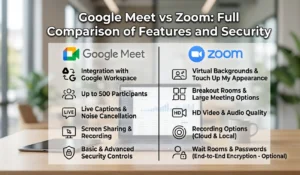
Choosing the right video conferencing platform can make or break your team’s productivity. In the debate of Google Meet vs Zoom, both tools are powerful, widely used, and packed with features — but they serve different audiences in different ways. Whether you manage a remote team, teach online classes, or run client calls, understanding the real differences between these two platforms helps you make a smarter, more cost-effective choice. This guide covers everything: features, pricing, security, use cases, and a clear final verdict.
Table of contents
- What Is Google Meet?
- What Is Zoom?
- Zoom vs Google Meet: Overview of Both Platforms
- Google Meet vs Zoom – Feature Breakdown
- Google Meet vs Zoom Pricing Comparison
- Google Meet vs Zoom Security Comparison
- Pros and Cons of Google Meet vs Zoom
- Google Meet vs Zoom for Business, Remote Work and Online Classes
- Which Is Best? Final Verdict
- Conclusion
What Is Google Meet?
Google Meet is Google’s enterprise video conferencing platform, built directly into the Google Workspace ecosystem. Originally launched as Google Hangouts Meet, it has evolved into a full-featured meeting tool tightly integrated with Gmail, Google Calendar, Google Drive, and Google Classroom.
Google Meet operates directly within your web browser, allowing users to join meetings without installing extra software, while dedicated mobile apps remain available for iOS and Android. Its fast, user-friendly design and seamless integration with Google Workspace make it a popular communication solution for businesses, teams, and organizations.
What Is Zoom?
Zoom is a standalone video conferencing platform that became the dominant remote meeting tool during the global shift to remote work. Known for its reliability, feature depth, and ease of use, Zoom supports everything from one-on-one calls to large webinars with thousands of participants.
Unlike Google Meet, Zoom operates as a dedicated application — users download and install the Zoom client on their device. It integrates with wide range of third-party tools including Slack, Outlook, Salesforce, and hundreds of others via Zapier. Zoom’s breadth of features and large free-tier participant limits made it the default choice for millions of teams worldwide.
Zoom vs Google Meet: Overview of Both Platforms
When evaluating zoom vs google meet, the clearest difference is ecosystem fit. Google Meet thrives inside the Google Workspace world. Zoom thrives as a standalone powerhouse with broad third-party integrations.
Both are leading online meeting platforms with strong mobile apps, reliable audio/video quality, and enterprise-grade security options. The right choice depends heavily on what tools your team already uses, what features you need, and what your budget allows. In the sections below, google meet vs zoom gets broken down feature by feature so you can make a fully informed decision.
Whether you use Zoom or Google Meet, understanding meeting efficiency is important. Use our Meeting Cost Calculator to estimate the cost of team meetings.
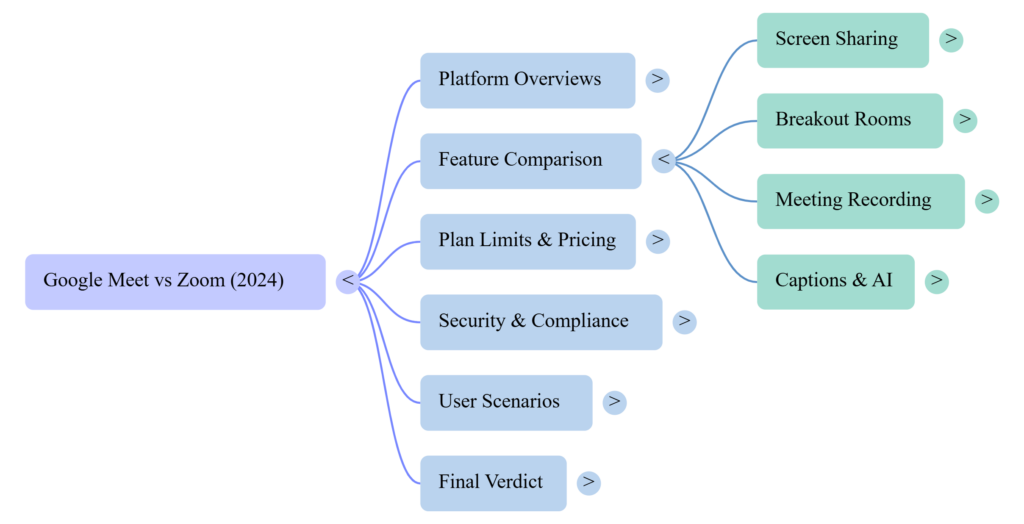
Google Meet vs Zoom – Feature Breakdown
This is where google meet vs zoom differences become most visible. Each platform approaches core features slightly differently — and those differences matter in daily use.
Screen Sharing Features
Both platforms support full-screen sharing with audio. Zoom edges ahead with more granular options — users can share a specific application window, a portion of the screen, or a second camera feed. Zoom also offers annotation tools that let multiple participants draw on the shared screen simultaneously.
Google Meet offers clean, reliable screen sharing with tab, window, or full-screen options. It added annotation tools in 2023, closing the gap with Zoom. For most standard meetings, both platforms perform equally well on screen sharing.
Breakout Rooms Comparison
Google Meet vs Zoom breakout room capabilities are comparable, but with different access rules. Zoom includes breakout rooms on its free and paid plans, with hosts able to create up to 50 rooms and allow participants to self-select rooms. Google Meet breakout rooms require a paid Google Workspace plan — free Gmail users do not have access. However, Google Meet’s pre-meeting room assignment via Google Calendar is a standout organizational feature for educators.
Google Meet users can improve team collaboration using breakout sessions. Learn more in our Google Meet Breakout Rooms guide.
Meeting Recording Options
Zoom allows local recording on all plans, including free. Cloud recording is available on paid plans. Google Meet only offers recording on paid Google Workspace plans — free users cannot record meetings. For teams that rely heavily on meeting archives and replays, this is a significant google meet vs zoom differentiator in Zoom’s favor.
If recording meetings is important for your workflow, see our Google Meet Recording Guide for detailed instructions.
Live Captions and Transcripts
Both platforms offer automatic live captions. Google Meet’s live captions are powered by Google’s speech recognition engine — widely regarded as highly accurate. Zoom offers live captions and full transcripts (with AI Companion) on paid plans. For accessibility and multilingual teams, both platforms cover the essentials, with Google Meet holding a slight edge in caption accuracy at no extra cost.
Participant Limits
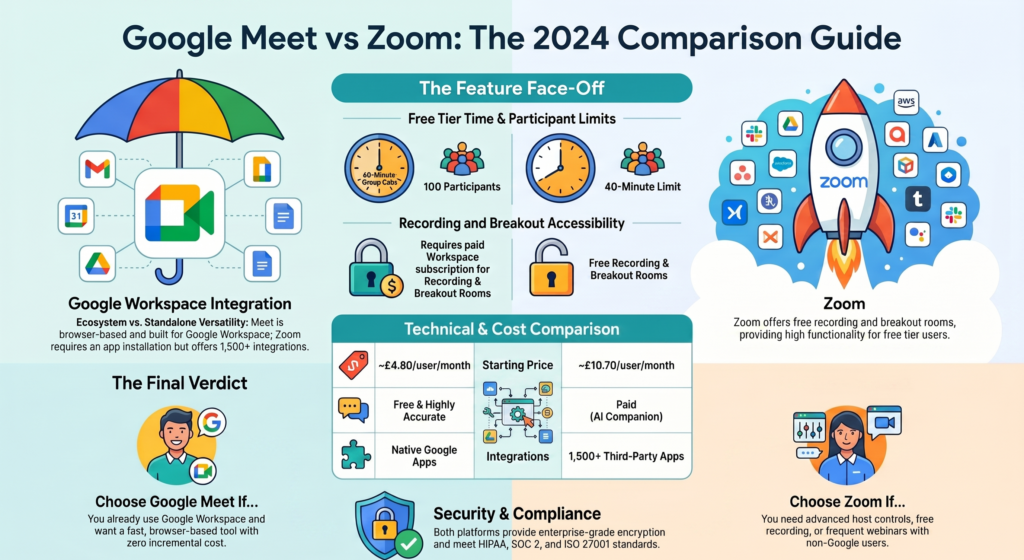
Zoom’s free plan supports up to 100 participants with a 40-minute limit on group calls. Zoom’s premium plans can accommodate meetings with as many as 1,000 attendees. In comparison, Google Meet’s free version allows up to 100 participants, offers unlimited one-on-one meetings, and applies a 60-minute duration limit to group video calls. Paid Google Workspace plans support up to 500 or 1,000 participants depending on the tier.
Mobile App Experience
Both platforms deliver strong mobile apps on iOS and Android. Zoom’s mobile app is feature-rich and mirrors the desktop experience closely. Google Meet’s mobile app is clean and fast but offers fewer host controls compared to its desktop version. For heavy mobile users, Zoom’s app provides a more complete feature set.
Integration With Productivity Tools
This is where ecosystem fit determines everything. Google Meet integrates natively with every Google Workspace tool — Gmail, Calendar, Drive, Docs, Sheets, Classroom, and more. Zoom integrates with over 1,500 third-party apps including Slack, Salesforce, HubSpot, Outlook, and Microsoft 365. If your team lives in Google Workspace, Google Meet wins on integration. If your stack is mixed or Microsoft-leaning, Zoom is the stronger connector.
Google Meet vs Zoom Pricing Comparison
Pricing is one of the most searched dimensions of google meet vs zoom — and rightly so, since meeting tool costs compound quickly across teams.
Google Meet is included in all Google Workspace plans starting at approximately $6 per user per month (Business Starter). A free version is available via personal Gmail with limited features.
Zoom offers a free plan (100 participants, 40-minute limit on group calls) and paid plans starting at approximately $13.32 per user per month (Pro). Business plans with more features start higher.
For teams already paying for Google Workspace, Google Meet adds zero incremental cost — making it the clear pricing winner for Google-native organizations. For teams not in Google’s ecosystem, Zoom’s standalone pricing is competitive and transparent.
Google Meet vs Zoom Security Comparison
Security is non-negotiable for enterprise teams, healthcare organizations, and educators handling sensitive data.
Both platforms offer end-to-end encryption for meetings. Zoom faced scrutiny in 2020 over security gaps but has since implemented robust encryption and compliance certifications including SOC 2, HIPAA, FedRAMP, and ISO 27001. Google Meet benefits from Google’s enterprise-grade security infrastructure and meets similar compliance standards including SOC 2, SOC 3, ISO 27001, and HIPAA.
In the google meet vs zoom security comparison, both platforms are enterprise-ready. Google Meet has a slight trust advantage for organizations already within Google’s security-managed environment, while Zoom’s compliance breadth makes it equally valid for regulated industries.
Pros and Cons of Google Meet vs Zoom
Google Meet — Pros:
- Zero extra cost for Google Workspace users
- Browser-based — no installation needed
- Superior integration with Google tools
- Accurate live captions on all plans
- Clean, distraction-free interface
Google Meet — Cons:
- Breakout rooms and recording require paid plans
- Fewer advanced host controls than Zoom
- Less useful for non-Google ecosystems
- Mobile app has limited host management
Zoom — Pros:
- Feature-rich free plan
- Local recording on all plans including free
- Breakout rooms available on free plan
- 1,500+ third-party integrations
- Advanced webinar and event capabilities
- More granular host and participant controls
Zoom — Cons:
- Higher per-user cost as a standalone tool
- Requires app installation
- AI features locked behind paid plans
- Can feel complex for simple use cases
Google Meet vs Zoom for Business, Remote Work and Online Classes
For business teams: If your company runs on Google Workspace, google meet vs zoom is a clear call — Google Meet is already paid for and deeply integrated. If your stack is mixed or Microsoft-leaning, Zoom’s broader integrations win.
For remote work: Zoom’s feature depth — including whiteboard, polls, reactions, and advanced breakout rooms on the free plan — makes it the stronger daily remote work tool for teams not anchored in Google’s ecosystem.
For online classes: Google Meet’s integration with Google Classroom makes it the top choice for K-12 and higher education institutions on Google Workspace for Education. Zoom’s recording on free plans and participant self-selection in breakout rooms give it an edge for independent educators and tutors.
Which Is Best? Final Verdict
The google meet vs zoom decision comes down to one question: what ecosystem does your team already live in?
Choose Google Meet if: You use Google Workspace, want zero incremental cost, and need clean, fast meetings tightly integrated with Gmail and Google Calendar.
Choose Zoom if: You need maximum feature flexibility, breakout rooms and recording on a free plan, broad third-party integrations, or run large webinars and events.
For meeting cost efficiency, Google Meet wins for Google-native organizations. For feature breadth and ecosystem flexibility, Zoom wins for everyone else. Both are excellent video conferencing tools — the best one is simply the one that fits your existing workflow.
Conclusion
The google meet vs zoom debate does not have a single winner — it has a right answer for each type of user. Google Meet is the smarter choice for organizations embedded in Google Workspace, offering seamless integration, competitive pricing, and reliable performance. Zoom is the stronger standalone platform for teams that need maximum feature flexibility, free-plan recording, and connections to a wide third-party app ecosystem.
Understanding exactly what your meetings cost — in time, tools, and per-seat subscriptions — is just as important as choosing the right platform. A Meeting Cost Calculator gives you the full financial picture of your virtual meeting stack, helping you choose and optimize tools that deliver real productivity value. Whichever platform you choose in the zoom vs google meet decision, make sure it is working as hard as your team does.
Explore our Digital Productivity guides for workplace productivity tips, collaboration tools, and practical calculators.
FAQs
Q1: Is Google Meet better than Zoom?
Neither is universally better. Google Meet is better for Google Workspace users due to seamless integration and zero added cost. Zoom is better for teams needing advanced features, broader integrations, or recording on a free plan.
Q2: Which is cheaper — Google Meet or Zoom?
For Google Workspace users, Google Meet is effectively free since it is included in their subscription. As a standalone tool, Google Meet’s paid plans start lower than Zoom’s. Zoom’s free plan is more feature-rich, however.
Q3: Does Google Meet have breakout rooms like Zoom?
Yes, but with a key difference. Google Meet breakout rooms require a paid Workspace plan. Zoom offers breakout rooms on its free plan, with more participant control options.
Q4: Which is better for online teaching — Google Meet or Zoom?
Google Meet is better for schools using Google Classroom and Google Workspace for Education. Zoom is better for independent educators who need free-plan recording and self-select breakout rooms.
Q5: Can I use Google Meet without a Google account?
Guests can join a Google Meet session via link without a Google account, but hosting and accessing advanced features requires a Google account — and a paid Workspace plan for full functionality.