Gross Up Calculator — Convert Net Pay to Gross Pay Instantly
When an employer promises an employee a specific net amount — a $5,000 bonus after taxes, a $3,000 relocation reimbursement that the employee keeps in full, or a guaranteed net paycheck — the math runs in reverse. Instead of calculating what an employee receives from a gross payment, the employer must determine how much gross pay is required so the employee nets a precise target amount. This is exactly what a gross up calculator does. It is one of the most misunderstood tools in payroll — and one of the most valuable for both employers and employees who need to navigate bonus payments, benefits, and net pay guarantees with precision. This guide explains every dimension of the gross up calculator, from the formula behind it to real-world use cases and platform-specific guidance.
Table of contents
- What Is a Gross Up Calculator?
- How a Gross Up Calculator Works
- Paycheck City and Gross Up — What You Need to Know
- Calculate Gross Pay From Net Pay — Practical Guide
- Gross Pay vs. Net Pay — Understanding the Difference
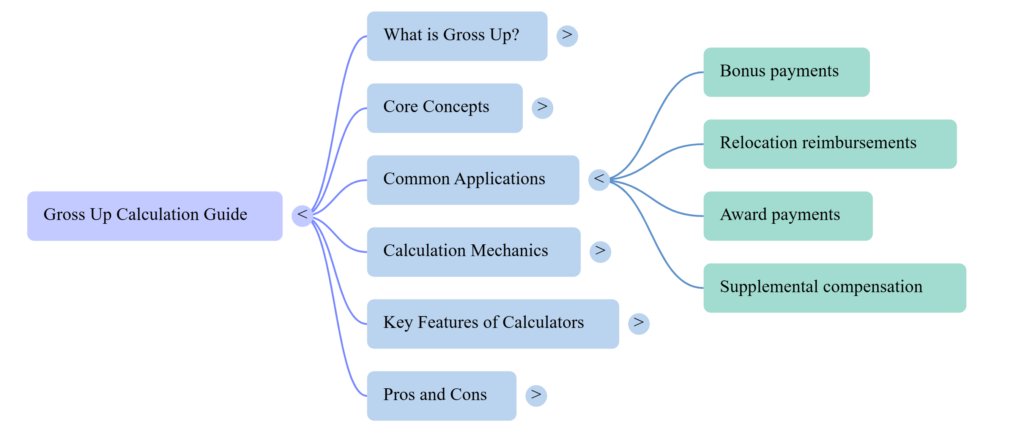
- Gross Up Calculator for Employers — Key Use Cases
- Payroll Deduction and Gross Up Guide
- Pros and Cons of Using a Gross Up Calculator
- Which Gross Up Calculator Is Best for You?
- Conclusion
What Is a Gross Up Calculator?
A gross up calculator is a reverse payroll tool that determines how much gross income an employer must pay so that an employee receives a specific net (after-tax) amount. Instead of the standard payroll direction — gross pay → taxes deducted → net pay — the gross up calculation runs backwards: net pay target → taxes added back → gross pay required.
The tool is most commonly used for bonus gross up calculations, relocation expense reimbursements, signing bonuses intended to arrive as a clean net figure, and any compensation scenario where the employer wants the employee to receive an exact after-tax sum without the employee needing to pay taxes from their own pocket.
Is Gross Before or After Tax?
This is one of the most searched payroll questions in the United States — and the answer is clear. Gross pay is always before tax. It is the total compensation before any federal income tax, state income tax, Social Security, Medicare, or voluntary deductions are removed. Net pay is what remains after all deductions have been applied.
When someone asks whether gross is before or after tax, the answer is: gross is the starting number. Net is the ending number. Every paycheck runs from gross to net. A gross up calculator works in the opposite direction — from net back to gross — which is why it requires knowing the applicable tax rates before it can produce a result.
Why Employers and Employees Use Gross Up Tools
Employers use a gross up calculator to honor commitments to deliver a specific net benefit. If a company promises to cover an employee’s relocation costs so the employee receives $10,000 free and clear, the employer cannot simply pay $10,000 — because the IRS treats relocation reimbursements as taxable income. The employee would owe taxes on that $10,000, netting less than promised. Grossing up the payment means the employer pays more than $10,000 so that after taxes, the employee receives exactly $10,000.
Employees use the tool to understand what gross amount corresponds to a promised net figure — particularly useful when evaluating job offers that promise specific take-home pay guarantees rather than gross salaries.
How a Gross Up Calculator Works
Every gross up calculator applies a straightforward formula to reverse-engineer gross pay from a net pay target. Understanding the mechanics builds confidence in the result and helps users identify when additional adjustments are needed.
Before estimating gross earnings, use our Salary to Hourly Calculator to convert annual income into hourly, weekly, and monthly pay.
The Gross Up Formula Explained
The core gross up formula is:
Gross Pay = Net Pay ÷ (1 − Combined Tax Rate)
Where the combined tax rate is the sum of all applicable withholding percentages — federal income tax rate, state income tax rate, Social Security rate (6.2%), and Medicare rate (1.45%).
Example: An employer wants an employee to net $5,000 from a bonus. The employee’s combined marginal tax rate is 35% (22% federal + 7.65% FICA + 5.35% state).
Gross Pay = $5,000 ÷ (1 − 0.35) = $5,000 ÷ 0.65 = $7,692.31
The employer pays $7,692.31 in gross bonus. After 35% is withheld in taxes ($2,692.31), the employee receives exactly $5,000 net. That is the gross up calculator in action.
Gross Up Payroll Tax — Step by Step
Applying a gross up calculator correctly requires identifying each tax layer that applies to the payment:
- Determine the net pay target — the exact amount the employee should receive after all taxes
- Identify all applicable tax rates — federal marginal rate, state income tax rate, Social Security (6.2%), Medicare (1.45%)
- Sum the combined tax rate — add all applicable percentages together
- Apply the formula — Gross = Net ÷ (1 − combined rate)
- Verify the gross up — multiply gross by combined rate; confirm the tax amount equals gross minus net target
For bonus payments specifically, the IRS allows employers to use the flat supplemental wage withholding rate of 22% (for payments up to $1 million) rather than the employee’s marginal bracket rate. Many employers use this simplified rate in their gross up calculator to reduce administrative complexity.
Paycheck City and Gross Up — What You Need to Know
Paycheck City is one of the most widely used free payroll calculator platforms in the US, and it includes a dedicated gross up calculator function alongside its salary and hourly paycheck tools.
Explore our Digital Productivity guides for additional payroll calculators, salary breakdowns, and income-planning resources.
How Paycheck City Handles Gross Up Calculations
The Paycheck City gross up tool accepts a net pay target as input, allows users to select federal and state tax rates, and returns the gross amount required to produce that net figure. The platform updates its tax tables annually, ensuring that the supplemental wage rate and current FICA percentages are applied accurately.
For employers who need to gross up a bonus or relocation payment quickly — without building a spreadsheet formula from scratch — the Paycheck City gross up calculator provides a reliable, free starting point. The tool is transparent about its inputs and outputs, showing both the gross amount required and the tax breakdown that produces the target net pay.
Paychex City vs. Paycheck City — Navigating Payroll Platforms
A common source of confusion: Paychex City and Paycheck City — sometimes also typed as “paycheck coty” — are frequently conflated in search queries despite being entirely different platforms.
Paychex is a major enterprise payroll processing company (paychex.com) that handles end-to-end payroll for businesses of all sizes, including tax filings, direct deposits, and compliance reporting. Its platform is subscription-based and designed for employers processing payroll regularly.
Paycheck City (paycheckcity.com) is a free payroll calculator tool used for estimation, verification, and educational purposes. It calculates paychecks and gross up amounts but does not process payroll or file taxes.
If you need to gross up a specific payment and want a quick calculation, Paycheck City is the right tool. If you need an enterprise payroll system to run payroll and file taxes, Paychex is the appropriate platform. The gross up calculator function is available on Paycheck City at no cost.
Calculate Gross Pay From Net Pay — Practical Guide
The most powerful application of a gross up calculator is converting a specific net pay promise into the gross amount an employer must fund. Here are the two most common real-world scenarios.
Gross Up for Bonuses
Bonus gross up is the most frequent use case for a gross up calculator. When an employer awards a performance bonus and wants the employee to receive a clean net amount — say, $2,500 after taxes — the gross up calculation determines the actual bonus payment required.
Using the IRS supplemental wage rate of 22% plus 7.65% FICA: combined rate = 29.65%.
Gross Bonus = $2,500 ÷ (1 − 0.2965) = $2,500 ÷ 0.7035 = $3,554.72
The employer issues a $3,554.72 gross bonus. After $1,054.72 in taxes (29.65%), the employee nets exactly $2,500. Without the gross up calculator, the employer would have paid $2,500 gross — and the employee would have netted only $1,759.
Gross Up for Relocation and Benefits
Relocation reimbursements, moving allowances, and certain fringe benefits are treated as taxable income by the IRS. An employer who offers to cover $8,000 in relocation costs cannot simply pay $8,000 without creating a tax burden for the employee. Grossing up the payment means the employee receives the full $8,000 benefit value without any personal tax consequence.
The same gross up calculator formula applies: determine the employee’s combined marginal tax rate, apply gross = net ÷ (1 − rate), and fund the resulting gross amount. The additional cost to the employer is the tax gross up amount itself — which many companies include in their relocation policy budgets.
Gross Pay vs. Net Pay — Understanding the Difference
Gross and net pay are the two poles of every paycheck — and understanding the difference is foundational to using any gross up calculator effectively.
| Term | Definition | Example on $6,000 Gross |
|---|---|---|
| Gross Pay | Total compensation before any deductions | $6,000.00 |
| Federal Income Tax | IRS withholding based on brackets and W-4 | −$720 (est. 12%) |
| State Income Tax | Varies by state | −$270 (est. 4.5%) |
| Social Security (6.2%) | FICA mandatory | −$372 |
| Medicare (1.45%) | FICA mandatory | −$87 |
| Net Pay | Take-home after all deductions | ~$4,551 |
The gross up calculator reverses this table entirely — starting from the net pay target ($4,551) and working upward to determine the gross amount ($6,000) required to produce it. Every tax rate in the table above becomes an input in the gross up formula.
State taxes can significantly affect take-home income, as shown in our Colorado Paycheck Calculator guide.
Gross Up Calculator for Employers — Key Use Cases
Employers across industries use a gross up calculator in several high-value payroll scenarios. Understanding these use cases clarifies when grossing up is the right approach — and when it is not.
Net Pay Guarantee Situations
Some employment agreements, particularly for executive-level hires or international relocations, include net pay guarantees — a commitment that the employee will receive a specific take-home amount regardless of their personal tax situation. In these cases, the employer absorbs all tax liability, and the gross up calculator determines exactly how much gross compensation must be paid to deliver the promised net figure.
Net pay guarantees are expensive for employers because the grossed-up amount itself is taxable, sometimes requiring a second round of gross up calculation — a “cascade gross up” — to account for the taxes on the gross up amount.
Supplemental Wage Gross Up Scenarios
The IRS classifies bonuses, commissions, overtime (in some cases), and severance as supplemental wages, subject to a flat 22% federal withholding rate (for amounts up to $1 million in 2024). Employers who want to gross up supplemental payments use this 22% flat rate — rather than the employee’s marginal bracket — to simplify the gross up calculator math while remaining IRS-compliant.
Payroll Deduction and Gross Up Guide
Understanding how standard payroll deductions interact with a gross up calculator is critical for accurate results. Pre-tax deductions — 401(k) contributions, health insurance premiums, FSA or HSA amounts — reduce the employee’s taxable income. This means the tax rate applied in a gross up calculation should reflect the employee’s effective tax rate after pre-tax deductions are accounted for, not their marginal rate on total gross pay.
For simplicity, most gross up calculator tools use the marginal tax rate or the IRS supplemental rate, which produces a conservative (slightly high) gross up estimate. The actual tax withheld may be slightly lower if the employee has significant pre-tax deductions — which means the employee would net slightly more than the target, not less.
Employers who need precision — especially for large gross up payments — should work with a payroll professional to apply the employee’s actual effective rate, incorporating all pre-tax deductions, rather than relying solely on an online gross up calculator result.
Pros and Cons of Using a Gross Up Calculator
Pros
Instant reverse payroll math. A gross up calculator performs complex reverse-tax calculations in seconds — math that would require multiple steps in a spreadsheet and deep familiarity with current tax rates. It eliminates calculation errors in high-stakes compensation scenarios.
Supports fair employee compensation. When employers gross up bonuses and relocation payments, employees receive the full intended benefit without personal tax liability. The gross up calculator makes this employer goodwill gesture financially precise.
Free and accessible on platforms like Paycheck City. Quality gross up calculator tools are freely available, requiring no subscription or software installation. Any employer or HR professional can access accurate gross up results at no cost.
Applicable to multiple payment types. The same gross up calculator formula applies to bonuses, relocation payments, signing bonuses, gift cards, and any other taxable benefit where the employer wants to deliver a clean net figure.
Transparent tax breakdown. A quality gross up calculator shows not just the gross amount required but the full tax breakdown — how much goes to federal, state, Social Security, and Medicare — giving employers a complete picture of the total payment cost.
Cons
Accuracy depends on correct tax rate inputs. A gross up calculator is only as accurate as the tax rates entered. Using the wrong state rate, outdated FICA percentages, or the wrong federal bracket produces an inaccurate gross up amount. Always verify current rates before running a high-value calculation.
Does not account for cascade gross up. The standard gross up calculator formula does not automatically account for the fact that the gross up amount itself is taxable income. For very precise net pay guarantees, a cascade gross up calculation — which grosses up the gross up — is required.
Pre-tax deductions complicate results. Standard gross up calculator tools use marginal rates, not effective rates adjusted for pre-tax deductions. Employees with large 401(k) contributions or health premium deductions will net slightly more than targeted — a minor inaccuracy that matters more for large payments.
Not a substitute for professional payroll guidance. For complex executive compensation packages, multi-state gross up scenarios, or international relocation gross ups, a gross up calculator provides a starting estimate — not a final number. Payroll compliance professionals should review results before processing.
Which Gross Up Calculator Is Best for You?
The right gross up calculator depends on your role, the type of payment being grossed up, and the level of accuracy required.
Employers grossing up a standard bonus need a tool that accepts net pay target input, allows tax rate entry for both federal and state, and returns an itemized gross amount. The Paycheck City gross up calculator handles this use case completely and at no cost.
HR professionals modeling relocation packages need a gross up calculator that supports custom combined tax rate entry — allowing them to input the employee’s specific state rate, federal marginal rate, and FICA percentages for precise results.
Employees evaluating a net pay guarantee in a job offer need the tool to run in the opposite direction of standard payroll — confirming that the promised gross payment will indeed deliver the promised net amount after all withholdings.
Small business owners processing a first-time gross up should start with a free tool like Paycheck City, verify the result using the formula manually (Net ÷ (1 − rate)), and consult their payroll processor before issuing the payment.
Payroll professionals and accountants handling cascade gross up scenarios or executive compensation gross ups should use spreadsheet-based models with current IRS Publication 15 rates rather than relying solely on a standard online gross up calculator.
If you’re converting annual salary figures, see our 70k a Year Is How Much an Hour? guide.
Conclusion
The gross up calculator is the most precise tool available for reverse-engineering gross compensation from a net pay commitment. Whether you’re an employer grossing up a bonus to deliver a clean take-home figure, an HR professional modeling relocation packages, or an employee verifying a net pay guarantee, the gross up calculator removes all ambiguity from the calculation.
Understanding that gross is always before tax — and that net pay is the result after every deduction layer is applied — is the foundation of every gross up scenario. The formula is simple: Net ÷ (1 − combined rate) = Gross. The execution requires accurate current tax rates, knowledge of which payment type applies, and awareness of any pre-tax deductions that affect the employee’s true effective rate.
Use the free gross up calculator on platforms like Paycheck City for standard bonus and relocation scenarios. Verify results manually using the formula. And for complex, high-value, or multi-state gross up situations, bring in a payroll professional to ensure full accuracy and IRS compliance.
FAQs
Q: What is a gross up calculator?
A gross up calculator is a reverse payroll tool that determines the gross pay amount an employer must pay so that an employee receives a specific net (after-tax) amount. It applies the formula: Gross = Net ÷ (1 − combined tax rate) to reverse-engineer gross compensation from a net pay target.
Q: Is gross pay before or after tax?
Gross pay is always before tax. It is the total compensation before any federal income tax, state income tax, Social Security, Medicare, or voluntary deductions are applied. Net pay is what remains after all deductions. The gross up calculator works backwards from net pay to determine gross pay.
Q: How do you gross up a bonus?
Identify the net bonus the employee should receive. Determine the combined tax rate (federal supplemental rate 22% + FICA 7.65% + applicable state rate). Apply the formula: Gross Bonus = Net Bonus ÷ (1 − combined rate). The result is the gross bonus the employer must pay so the employee nets the target amount.
Q: What is the difference between Paycheck City and Paychex?
Paycheck City is a free payroll calculator platform for estimating paychecks and gross up amounts. Paychex is an enterprise payroll processing company that handles full-service payroll including tax filings and direct deposits. They are separate companies. The gross up calculator available on Paycheck City is free and does not require a Paychex subscription.
Q: What is the IRS supplemental wage rate for gross up calculations?
For 2024, the IRS flat supplemental wage withholding rate is 22% for payments up to $1 million. Many employers use this rate in their gross up calculator for bonus gross up scenarios, as it simplifies the math while remaining IRS-compliant. Payments exceeding $1 million in a calendar year are subject to the 37% rate.
Q: Does a gross up calculator account for pre-tax deductions?
Standard gross up calculator tools use marginal tax rates and do not automatically adjust for pre-tax deductions like 401(k) contributions or health insurance premiums. Employees with significant pre-tax deductions will net slightly more than the target, because their actual taxable income is lower than the gross up formula assumes. For large or executive-level gross up payments, consult a payroll professional to apply the employee’s true effective tax rate.