Small Business Office Equipment: A Smart Buying Guide for Laptops, Printers and Projectors
Buying small business office equipment looks simple until the invoices start arriving. A laptop that seemed like a bargain slows down in its second year, a cheap printer eats through cartridges every month, and the projector in the meeting room washes out the moment someone opens the blinds. None of these are bad purchases on their own. They are mismatched purchases, and the mismatch usually comes from buying by price tag instead of by workload.
This guide takes a different route. Instead of a long shopping list, it walks through how to size each device to the way your team actually works, what each item really costs over its life, and in what order to buy so your budget lands where it matters most.
Why Most Office Equipment Lists Fall Short
Most checklists you will find online tell you what to buy: computers, monitors, a printer, a router, maybe a projector. That is useful for the first five minutes. What they rarely cover is the part that decides whether the purchase was smart:
- Running costs. Ink, toner, lamps, and repairs often cost more than the device itself over a few years.
- Lifespan. Different devices wear out at very different speeds, so they should not all sit on the same replacement plan.
- Sizing. A projector or printer that is right for a five-person office is wrong for a twenty-person one.
- Buying order. When the budget is tight, some items need to come first and others can wait.
The sections below fill those gaps, device by device.
Start With a Workload Audit, Not a Shopping Cart
Before comparing models, spend an hour writing down how your team works. Three questions do most of the job:
- Who moves around? Staff who visit clients, travel, or split time between home and office need laptops. People who sit at the same desk all day usually get more value from a desktop and a good monitor.
- What gets printed, and how much? Count roughly how many pages leave the office each month, and how many of them are in color.
- How do you meet? Small huddles around a screen need very different gear from client presentations in a bright room.
If part of your team works remotely, it is worth running the numbers with a work-from-home savings calculator before you decide how many desks and full workstations you really need in the office.
Laptops and Desktops: Match the Machine to the Job
Computers are the core of any small business office equipment setup. For everyday office software such as email, spreadsheets, accounting tools, and video calls, a mid-range business machine is enough. Paying for top-tier processors only makes sense for design, video editing, or data-heavy work.
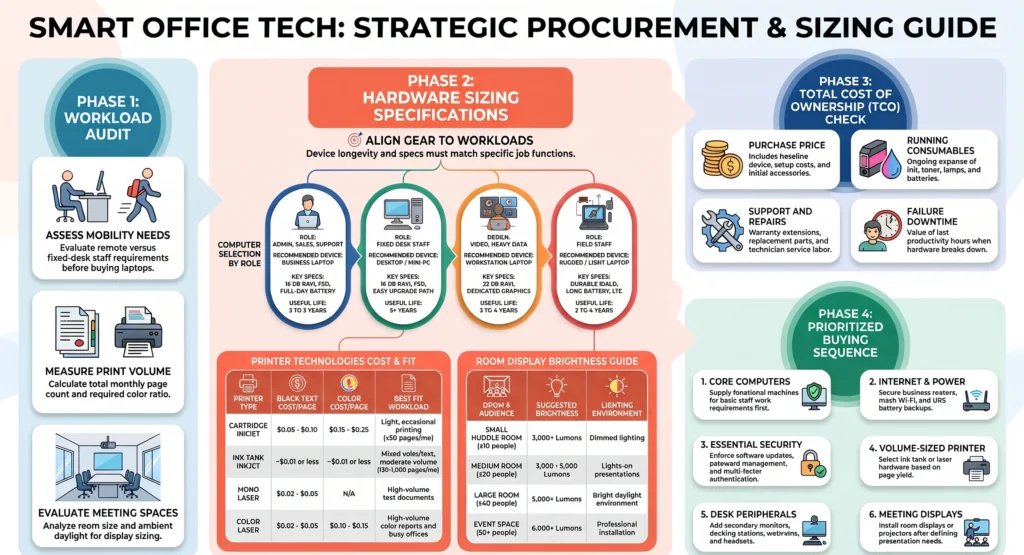
| Role | Recommended device | Key specs to look for | Typical useful life |
|---|---|---|---|
| Admin, sales, support | Business laptop | 16 GB RAM, SSD storage, full-day battery | 3 to 5 years |
| Fixed-desk staff (accounts, reception) | Desktop or mini PC + monitor | 16 GB RAM, SSD, easy upgrade options | 5 years or more |
| Design, video, heavy data | Performance laptop or workstation | 32 GB RAM, dedicated graphics | 3 to 4 years |
| Field staff and site visits | Rugged or lightweight laptop | Durable build, long battery, LTE option | 3 to 4 years |
A useful rule: laptops generally last three to five years, while desktops tend to stay productive longer because parts like memory and storage are cheaper to upgrade. Many IT teams plan a refresh around the four-year mark, because older machines start costing more in repairs and lost time than they save.
Two small extras give a big return: a second monitor for anyone who juggles multiple windows, and a docking station for laptop users so they can plug into a full desk setup in seconds.
Printers: Look at Cost per Page, Not the Sticker Price
Among all small business office equipment, the printer is where most offices overspend without noticing. The purchase price is visible; the ink is not. The number that matters is cost per page, which you can work out from any printer’s refill price and page yield:
Cost per page = price of the refill ÷ number of pages it prints
Here is how the main printer types compare in typical use:
| Printer type | Typical black text cost per page | Color cost per page | Best fit |
|---|---|---|---|
| Cartridge inkjet | About 5 to 10 cents | About 15 to 25 cents | Very light, occasional printing |
| Ink tank inkjet | Around 1 cent or less | Very low, often near 1 cent | Mixed color and text, moderate volume |
| Mono laser | About 2 to 5 cents | Not available | High-volume text documents |
| Color laser | About 2 to 5 cents | About 10 to 15 cents | Busy offices printing color reports |
Figures vary by model and by how much ink each page uses, but the pattern holds. A cartridge inkjet that costs very little up front can become the most expensive printer in the office within a year if it prints every day.
A quick way to decide: if your office prints under 50 pages a month, you may not need a dedicated printer at all. Between roughly 150 and 1,000 pages a month, an ink tank or a mono laser usually wins. Beyond that, a laser or multifunction model with a high-yield toner is the safer choice. Pick a wireless, multifunction model if you scan contracts or receipts, since it saves buying a separate scanner.
Projectors and Meeting Room Screens: Size Them to the Room
Projectors are the piece of office equipment most often bought on resolution alone, but brightness decides whether people can actually read your slides. Brightness is measured in ANSI lumens, and the right number depends on room size and how much light gets in.
| Room and audience | Suggested brightness | Notes |
|---|---|---|
| Small huddle room, up to 10 people | 3,000 lumens or more | Fine with lights dimmed |
| Medium meeting room, up to 20 people | 3,500 to 5,000 lumens | Good for lights-on presentations |
| Large room, up to 40 people | 5,000 lumens or more | Needed for daylight and big screens |
| Hall or event space, 50+ people | 6,000 lumens or more | Usually installed by a specialist |
These ranges follow manufacturer guidance such as BenQ’s business projector buying guide. If your room gets direct sunlight, move one step up the table.
Also consider laser light sources over traditional lamps. They cost more up front, but they avoid lamp replacements and keep their brightness longer. For very small rooms, a large flat-panel display can be simpler than a projector, especially if most meetings are video calls. If you are still choosing a calling platform for those meetings, this Google Meet vs Zoom comparison covers the trade-offs.
Networking, Power, and Audio: The Easy-to-Forget Essentials
Some of the most important small business office equipment never appears on the desk:
- Router and Wi-Fi. The free router from your internet provider is often fine for three or four people, but larger offices benefit from a business router or a mesh system that covers every room.
- Backup power. A UPS (uninterruptible power supply) protects computers and network gear from power cuts and surges. You can size one with a battery backup time calculator so it runs long enough to save work and shut down safely.
- Audio and webcams. A decent headset and webcam make every video call clearer, and they cost far less than a dedicated conference system.
- Security. New devices should be set up with updates, strong passwords, and multi-factor login from day one. As the team grows, managed monitoring is worth a look; our guide to SOC monitoring and managed IT security explains how it works.
Total Cost of Ownership for Small Business Office Equipment
The smartest way to compare two products is over their whole life, not on the day you buy them. A simple total cost of ownership check covers four parts:
| Cost element | What to include | Easy to overlook? |
|---|---|---|
| Purchase price | Device, accessories, setup | No |
| Consumables | Ink, toner, lamps, batteries | Yes |
| Support and repairs | Warranty upgrades, parts, technician time | Yes |
| Downtime | Hours lost when a device fails | Very often |
Warranty deserves special attention. Small businesses rarely have in-house IT staff, so a three-year on-site or next-business-day warranty on laptops and printers can be cheaper than a single out-of-warranty repair. Check the terms before you buy, especially for devices your team cannot work without.
Buying Small Business Office Equipment on a Tight Budget
If you cannot buy everything at once, this order protects day-to-day work first:
- Computers for every working role. Nothing else matters if people cannot do their core tasks.
- Reliable internet, router, and backup power. These keep every other device useful.
- Security basics. Updates, password management, and multi-factor login cost little and prevent expensive problems.
- A printer sized to your real volume. Use the cost-per-page table to choose.
- Monitors, docks, headsets, and webcams. Small upgrades with a quick productivity payoff.
- Meeting room display or projector. Buy once you know how often you present and to how many people.
Where to Buy Small Business Office Equipment: A Closer Look at PCredCom
Once you know what you need, the next decision is where to buy it. For businesses operating in Mexico, one retailer worth putting on your shortlist is PCredCom, an online computer and electronics store based in Monterrey, Nuevo León, that ships orders across the country. The company has been in business since 2008, so it has been supplying offices, schools, and IT buyers for well over a decade.
What You Can Buy at PCredCom
What makes PCredCom useful for a project like this is that its catalog lines up closely with the checklist in this guide. Instead of ordering from five different stores, you can source most of an office setup in one place:
| Need from this guide | What PCredCom offers | Why it helps |
|---|---|---|
| Computers for every role | Laptops, desktops, workstations, tablets, and servers, including branded and custom-assembled PCs | Match each machine to the job, from reception to design work |
| Printers and running costs | Printers plus ink cartridges, toners, drums, and specialty paper | Check refill prices and work out cost per page before you buy |
| Projectors and meeting rooms | Projectors from brands such as Epson, BenQ, ViewSonic, Panasonic, Sony, NEC, and InFocus, with mounts, screens, and replacement lamps | Equip a full meeting room in a single order |
| One-off events | Projector rental | Avoid buying a second projector for occasional training days or events |
| Front desk and retail counters | Point-of-sale gear such as barcode scanners, ticket printers, and cash drawers | Useful if your office also serves walk-in customers |
| Software and licensing | Business, network, and point-of-sale software licenses | Keep licenses consistent across every machine |
| Team communication | Two-way radio equipment | Practical for warehouses, job sites, and events |
Services Beyond the Hardware
PCredCom is more than a product catalog. The company also provides technical services for businesses, including preventive maintenance plans for computers and networks, structured cabling and wireless coverage, router and switch setup, IP and analog security camera projects, and specialized data recovery. For a small office without its own IT department, having the same supplier help install and look after the equipment it sells can save time and prevent costly setup mistakes.
Tips for Ordering Office Tech From PCredCom
- Compare brands inside one category. Because the store carries several projector and printer brands, you can line up brightness, resolution, and refill costs side by side instead of jumping between websites.
- Check consumables before the printer. Look up the matching ink or toner in the consumables section first, then run the cost-per-page formula from earlier in this guide.
- Talk to the sales team for multi-desk orders. If you are equipping several workstations at once, contact them to confirm stock and ask about pricing for multiple units.
- Confirm the Windows edition. PCredCom itself points out that computers used in a company should run Windows Professional or higher, which matters for security and device management.
- Review shipping and payment options. Read the store’s service pages before ordering, especially for large or time-sensitive purchases.
For a small business that wants fewer suppliers, simpler invoicing, and a catalog built around office technology, PCredCom is a practical place to start. Whichever store you choose, always compare consumable prices and warranty terms on the product page before you add anything to your cart.
Final Thoughts
Good small business office equipment is not about buying the most powerful device in each category. It is about matching every purchase to a real workload, checking what it will cost over three to five years, and buying in an order that keeps your team productive from day one. Start with a quick audit, use the tables above as a checklist, and revisit your setup once a year. That habit alone will save more money than any single discount.