Paycheck City: Free Payroll Calculator That Does It All
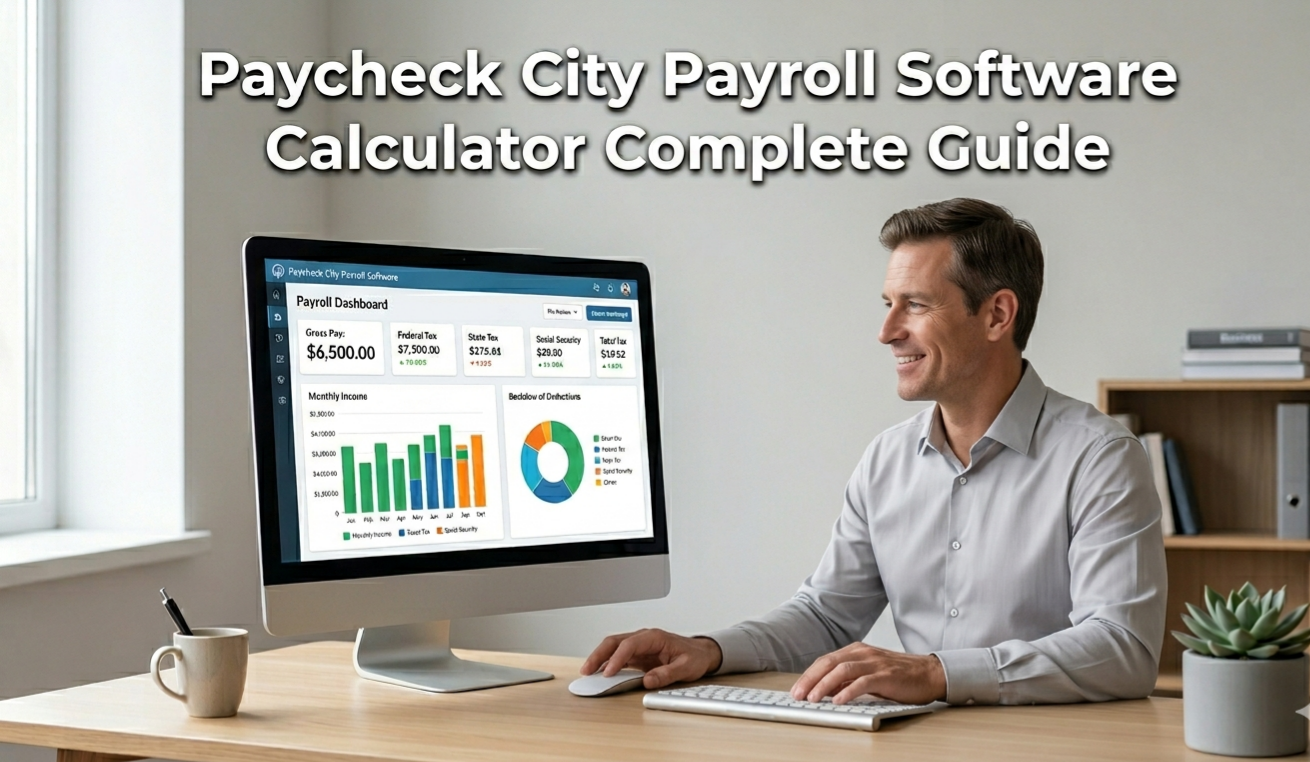
Most employees accept their paycheck without ever verifying a single number. Most small business owners process payroll without fully understanding the tax math behind every deduction. Paycheck City exists to fix both problems — and it does so completely free. Whether you’re an employee trying to understand your take-home pay or an employer who needs to run payroll quickly and accurately, Paycheck City delivers the digital tools to make payroll calculation fast, transparent, and reliable. This complete guide covers every feature, explains how the tax math works, and helps you decide whether Paycheck City is the right free payroll software for your situation.
Table of contents
- What Is Paycheck City?
- How to Use Paycheck City Calculator?
- Free Payroll Software — What Paycheck City Offers
- Paycheck City Take-Home Pay Guide
- Run Payroll with Free Tools — How It Works
- Runpayroll Login and Access — Navigating Payroll Platforms
- Check City vs. Paycheck City — Understanding the Difference
- Pros and Cons of Using Paycheck City
- Which Is Best — Paycheck City vs. Other Free Payroll Calculators?
- Conclusion
What Is Paycheck City?
Paycheck City is one of the most widely used free payroll calculator platforms in the United States. It provides a suite of online tools that calculate employee net pay after applying federal income tax, state income tax, FICA (Social Security and Medicare), and any pre-tax or post-tax deductions the user enters. The platform serves both individual employees who want to understand their paycheck and employers or HR professionals who need to estimate payroll costs quickly without subscribing to expensive payroll software.
Unlike enterprise payroll platforms that charge monthly fees, Paycheck City operates as a free digital productivity tool — making it especially valuable for freelancers, small business owners, and workers who need a fast, accurate paycheck estimate without a software commitment.
How Paycheck City Works as a Free Payroll Tool
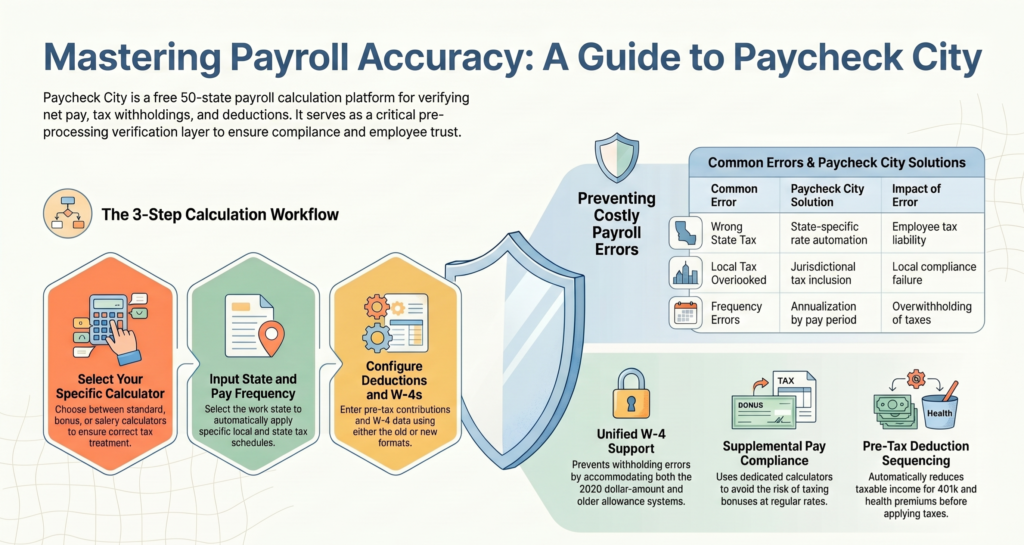
The Paycheck City tool operates on a straightforward input-output model. A user enters their gross pay or hourly rate, selects their pay frequency, inputs their W-4 filing status and any deductions, and the calculator returns a complete itemized paycheck — showing federal tax, state tax, Social Security, Medicare, and final net pay.
The platform updates its tax tables annually to reflect current IRS brackets, FICA rates, and state tax schedules. That commitment to accuracy is what separates Paycheck City from generic calculators that use outdated data and produce unreliable results.
Who Uses Paycheck City — Employees and Employers Alike
Paycheck City serves a wide and diverse user base. Employees use it to verify their employer’s payroll math, model the impact of a raise, or understand their take-home pay before accepting a job offer. Employers and HR professionals use it to estimate payroll costs, answer employee compensation questions, and sanity-check payroll processing outputs.
Freelancers transitioning from self-employment to W-2 employment use Paycheck City to understand what withholding means for their monthly cash flow. Job seekers use it to compare competing offers in after-tax, real-dollar terms rather than gross salary comparisons that obscure the true financial picture.
How to Use Paycheck City Calculator?
Getting accurate results from the Paycheck City calculator takes under two minutes. The interface is clean, the inputs are intuitive, and the output is fully itemized — meaning you see every deduction, not just a final number.
Step-by-Step Paycheck Calculation Guide
- Select your calculator type — choose salary, hourly, or gross-to-net based on your pay structure
- Enter gross pay — annual salary or hourly rate × hours worked
- Choose pay frequency — weekly, biweekly, semi-monthly, or monthly
- Enter filing status — single, married filing jointly, or head of household from your W-4
- Add state — select your state for accurate state income tax withholding
- Input pre-tax deductions — 401(k) contributions, health insurance premiums, FSA or HSA amounts
- Review itemized output — federal tax, state tax, Social Security, Medicare, other deductions, and net pay
Each field you complete improves the accuracy of your result. A Paycheck City estimate completed with all inputs — including state and pre-tax deductions — is remarkably close to what a professional payroll processor would produce.
Paycheck City Payroll Tax Calculator — Federal and State
The Paycheck City payroll tax calculator applies tax in two layers. Federal withholding uses the current IRS tax brackets and your W-4 filing status to determine how much federal income tax is withheld per paycheck. State withholding uses the applicable state’s published tax rates — whether flat or graduated — for the state you select.
For state-specific paycheck calculations, explore our guides to the Arizona Paycheck Calculator, Kentucky Paycheck Calculator, and Nevada Paycheck Calculator.
FICA is applied universally: 6.2% for Social Security (up to the annual wage base) and 1.45% for Medicare (no cap). For high earners, the additional 0.9% Medicare tax on wages above $200,000 is also factored in. The Paycheck City payroll tax calculator handles all of this automatically — you don’t need to know any of the rates to get an accurate result.
Free Payroll Software — What Paycheck City Offers
Free payroll software ranges from basic gross-to-net calculators to full-featured payroll processing platforms. Paycheck City occupies a strategic middle ground — more capable than a simple tax calculator, but without the complexity or cost of platforms like Gusto, ADP, or QuickBooks Payroll.
Paycheck City Salary Calculator Features
The Paycheck City salary calculator accepts annual salary input and distributes it across the selected pay frequency — 26 periods for biweekly, 24 for semi-monthly, 52 for weekly. It applies all applicable tax rates and allows users to enter pre-tax and post-tax deductions for maximum accuracy.
Employees who want to compare annual compensation with an hourly rate can use our Salary to Hourly Calculator.
For salaried employees who receive consistent paychecks every cycle, the salary calculator is the most useful mode. It’s particularly valuable during open enrollment, when changing health insurance tiers or 401(k) contribution rates can significantly shift net pay.
Paycheck City Net Pay Estimator — Hourly and Salaried
The Paycheck City net pay estimator handles both hourly and salaried pay structures. For hourly workers, it accepts regular hours and overtime hours separately, applying the 1.5× overtime rate to eligible hours before tax calculations. In salaried workers, it converts annual compensation to per-period gross and applies all withholding layers.
For a detailed explanation of converting hourly wages into annual income, read our Hourly to Salary Calculator Guide.
The net pay estimator is the tool employees rely on most frequently for budgeting and financial planning. Knowing your per-period net pay — not your gross salary — is the foundation of a workable household budget.
Paycheck City Take-Home Pay Guide
Understanding what the Paycheck City tool calculates requires understanding the gap between gross pay and take-home pay — a gap most employees dramatically underestimate when they first encounter their real paycheck.
Gross Pay vs. Net Pay Explained
Gross pay is your total compensation before any deductions. It’s the number in your job offer letter, your annual salary figure, or your hours multiplied by your hourly rate. It is the ceiling, not the floor, of your income.
Net pay is what you actually receive. For most employees, net pay is 70–80% of gross pay. The gap is created by three mandatory withholding categories: federal income tax, state income tax, and FICA (Social Security and Medicare). Paycheck City quantifies that gap precisely — showing you every dollar removed and where it goes.
| Deduction Category | Who It Goes To | Rate |
|---|---|---|
| Federal Income Tax | IRS | 10%–37% (bracket-based) |
| State Income Tax | State government | Varies (0% to 13.3%) |
| Social Security | SSA | 6.2% up to wage base |
| Medicare | CMS | 1.45% (no cap) |
| Pre-Tax Deductions | Employer benefits | Variable (401k, FSA, HSA) |
Payroll Deductions — What Comes Out of Every Paycheck
Paycheck City distinguishes between mandatory and voluntary deductions — a distinction that empowers users to understand which deductions they control and which they don’t.
Mandatory deductions — cannot be avoided:
- Federal income tax
- State income tax (where applicable)
- Social Security (6.2%)
- Medicare (1.45%)
Voluntary pre-tax deductions — reduce taxable income:
- Traditional 401(k) or 403(b) contributions
- Employer health, dental, and vision insurance premiums
- Flexible Spending Account (FSA) contributions
- Health Savings Account (HSA) contributions
Voluntary post-tax deductions — reduce take-home but not taxes:
- Roth 401(k) contributions
- Supplemental insurance premiums
- Charitable payroll giving
Entering all three categories in the Paycheck City calculator produces the most accurate net pay estimate possible.
Run Payroll with Free Tools — How It Works
Run payroll refers to the process of calculating each employee’s net pay for a given period, applying tax withholdings, and processing disbursement — whether via direct deposit, check, or another payment method. For small business owners and solo operators, running payroll correctly is both a legal obligation and a financial management task.
Paycheck City simplifies the calculation step of this process. Enter each employee’s gross pay, filing status, state, and deductions — and receive a fully itemized paycheck calculation. While Paycheck City does not process direct deposits or file payroll taxes on your behalf, it gives you the calculation foundation that more comprehensive (and expensive) payroll platforms automate.
For very small businesses or sole proprietors paying one or two workers, combining Paycheck City‘s free payroll calculation with a basic accounting tool creates a low-cost payroll workflow that meets most operational needs.
Runpayroll Login and Access — Navigating Payroll Platforms
Runpayroll login refers to accessing payroll platforms — often branded “Run Payroll” — that handle end-to-end payroll processing including tax filing, direct deposit management, compliance reporting, and employee self-service portals. These platforms typically require subscription accounts, and login access is the gateway to their full feature set.
Paycheck City sits upstream of these platforms in the payroll workflow. It handles the calculation and estimation layer — the math that tells you what each paycheck should contain. Full-service run payroll platforms then handle the processing, filing, and payment execution layer. Using Paycheck City alongside a payroll login platform gives users both transparency into the math and automation in the execution — a powerful combination for small business payroll management.
Check City vs. Paycheck City — Understanding the Difference
A common point of confusion: Check City and Paycheck City are entirely different entities. Understanding the distinction prevents misdirected searches and ensures users find the tool they actually need.
Check City is a financial services company offering payday loans, check cashing, and short-term lending services. It is not a payroll calculator or payroll software platform. It serves consumers who need immediate cash access against their upcoming paycheck.
Paycheck City is a free payroll and tax calculation platform that estimates net pay, models payroll deductions, and provides educational resources on federal and state payroll taxes. It serves employees, employers, and HR professionals who need accurate paycheck math — not financial lending services.
If you searched for “check city” while looking for a paycheck calculator, Paycheck City is the correct destination. The two brands share no operational overlap despite the similar naming.

Pros and Cons of Using Paycheck City
Pros
Completely free to use. No subscription, no sign-up, no credit card required. Paycheck City provides full calculator access at zero cost — making it accessible to every employee and small business owner regardless of budget.
Covers all 50 states. The Paycheck City calculator applies accurate state income tax rates for every US state — a critical advantage over tools that calculate only federal withholding and ignore state deductions.
Supports multiple pay structures. Hourly, salary, bonus, and commission paycheck types are all supported. The Paycheck City net pay estimator handles the full spectrum of US compensation structures.
Detailed, itemized output. Every deduction appears as a line item. Federal tax, state tax, Social Security, Medicare, and each voluntary deduction are shown separately — giving users full visibility into their paycheck math.
Updated tax tables annually. Paycheck City updates its federal and state tax data each year, ensuring that rate-sensitive calculations use current IRS brackets and state schedules.
Cons
Does not process payroll. Paycheck City calculates paychecks but does not execute direct deposits, file payroll taxes, or generate W-2 forms. Employers who need full payroll processing require a separate platform.
No payroll history or employee records. Unlike subscription payroll software, Paycheck City does not save calculation history, maintain employee profiles, or integrate with HR systems.
Manual data entry required each time. There is no saved profile or recurring payroll setup — each use requires re-entering inputs from scratch, which can be time-consuming for employers with multiple employees.
Complexity for multi-state situations. Employees who live in one state and work in another — a common scenario in metro areas straddling state lines — may require additional research to determine which state’s withholding rules apply.
Which Is Best — Paycheck City vs. Other Free Payroll Calculators?
For pure paycheck calculation and take-home pay estimation, Paycheck City is the industry standard for free tools — and for good reason. Its combination of state-level accuracy, multiple pay type support, and completely free access makes it the go-to resource for millions of users.
Here is how Paycheck City compares to other free payroll calculation options:
| Feature | Paycheck City | Generic Tax Calculators | Payroll Software Free Tiers |
|---|---|---|---|
| All 50 states supported | Yes | Often federal only | Yes |
| Updated tax rates | Annual | Inconsistent | Annual |
| Pre-tax deduction inputs | Full | Limited | Full |
| Payroll processing | No | No | Yes (limited) |
| Cost | Free | Free | Free tier limited |
| Employee record keeping | No | No | Yes |
The verdict: For calculation and estimation — employees verifying paychecks, employers estimating payroll costs, and job seekers comparing offers — Paycheck City is the best free tool available. For end-to-end payroll processing including tax filings and direct deposits, a full-service platform is necessary. Paycheck City excels in its lane and does so completely free.
Conclusion
No employee should be in the dark about their own paycheck. No small business owner should process payroll without understanding the tax math behind every deduction. Paycheck City solves both problems with a free, accurate, and accessible payroll calculator that serves millions of users across every state and every pay structure.
From the Paycheck City salary calculator that converts annual offers into biweekly net pay figures, to the net pay estimator that handles overtime, pre-tax deductions, and state-specific withholding — every tool on the platform is built for clarity. Whether you need to verify your pay stub, compare two job offers in after-tax terms, model your open enrollment decisions, or simply understand where your money goes on payday, Paycheck City delivers the answer — completely free.
Paycheck City is one example of how digital tools can simplify everyday financial tasks. From estimating take-home pay to understanding payroll deductions, the right online resources can save time and improve financial decisions. Explore more useful tools and guides in our Digital Productivity category to discover practical solutions for managing everyday tasks more efficiently.
Run the numbers. Know your pay. Take control of your financial picture — one paycheck at a time.
FAQs
Q: What is Paycheck City?
Paycheck City is a free online payroll calculator platform that estimates employee net pay after applying federal income tax, state income tax, Social Security, Medicare, and voluntary deductions. It is used by employees, employers, and HR professionals across all 50 US states.
Q: Is Paycheck City free to use?
Yes. Paycheck City is entirely free. There is no subscription fee, no sign-up requirement, and no credit card information needed. All calculators — salary, hourly, bonus, and commission — are available at no cost.
Q: How accurate is Paycheck City?
Paycheck City is highly accurate when users enter complete and correct inputs. The platform updates its federal and state tax tables annually. Results closely match what professional payroll processors produce, though minor differences may arise from mid-year tax changes or employer-specific deduction structures.
Q: Can Paycheck City run payroll for my small business?
Paycheck City calculates paycheck amounts but does not process payroll, execute direct deposits, or file payroll taxes. It is a calculation tool, not a full payroll processing platform. Small business owners who need complete payroll processing should use a dedicated payroll service alongside the Paycheck City calculator for accurate estimates.
Q: What is the difference between Check City and Paycheck City?
Check City is a financial services company offering payday loans and check cashing. Paycheck City is a free payroll and tax calculation platform. They are entirely different businesses with no operational overlap. If you need paycheck math help, Paycheck City is the correct tool.
Q: Does Paycheck City cover all US states?
Yes. The Paycheck City calculator supports all 50 states and applies each state’s current income tax rates — whether flat, graduated, or zero — to produce accurate state withholding figures in addition to federal calculations.