SOC Monitoring, Managed IT and Penetration Testing: How They Work Together to Protect Your Business

Most small and mid-sized businesses don’t get hacked because they are careless. They get hacked because nobody is watching at 2 a.m. on a Sunday, when a staff laptop clicks a bad link and ransomware quietly starts encrypting the file server. Without SOC monitoring, that attack often goes unnoticed until Monday morning.
That is exactly the gap SOC monitoring is built to close. Paired with reliable managed IT support and regular penetration testing, it gives a growing company the kind of protection that used to be available only to banks and telecom giants.
In this guide, we break down what each service actually does, how they fit together, and what to look for before you sign a contract.
Why Cybersecurity Is Now a Business Problem, Not Just an IT Problem
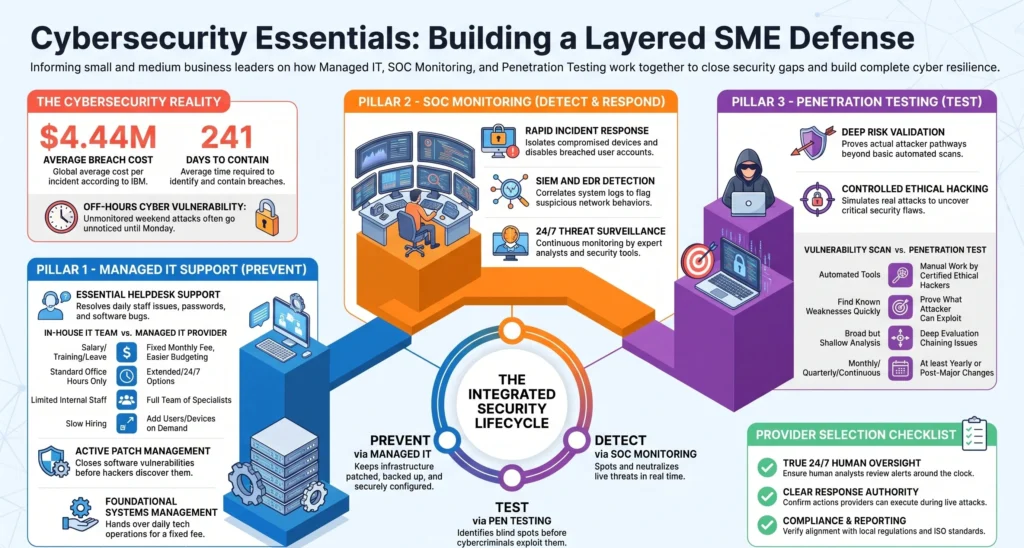
A data breach is no longer a rare event that happens to someone else. According to IBM’s Cost of a Data Breach Report 2025, the global average cost of a breach sits at about USD 4.44 million, and it still takes organizations around 241 days to identify and contain one.
For a small business, the money is only part of the damage. For example, downtime stops sales, customers lose trust, and regulators may come asking questions. In addition, in Zimbabwe the Cyber and Data Protection Act expects businesses to put appropriate technical safeguards around personal data.
The good news? You don’t need a 20-person security department. You need the right mix of three services.
What Is Managed IT Support?
Managed IT is the foundation. Instead of hiring a full internal IT team, you hand day-to-day technology management to a specialist provider for a predictable monthly fee.
A typical managed IT package covers:
- Help desk support for staff issues, password resets and software problems
- Device and endpoint management, including laptops, desktops and mobile devices
- Patch management so operating systems and apps stay up to date
- Microsoft 365 administration, licensing, backups, email security and tools like Microsoft Teams
- Network and infrastructure support for servers, Wi-Fi, firewalls, VPNs and UPS battery backup planning
Why it matters for security: unpatched software and misconfigured accounts are among the easiest doors for attackers. A well-run managed IT service closes many of those doors before a hacker ever finds them.
Managed IT vs. In-House IT at a Glance
| Factor | In-house IT team | Managed IT provider |
|---|---|---|
| Cost structure | Salaries, training, leave and turnover | Fixed monthly fee, easier to budget |
| Coverage hours | Usually office hours only | Often extended or 24/7 options |
| Skill range | Limited to the people you hire | Access to a whole team of specialists |
| Scaling | Slow; requires new hires | Add users or devices on demand |
| Best for | Large firms with complex in-house systems | SMEs and growing companies |
Not sure which option is cheaper for you? Run the yearly salary of an IT hire through our salary to hourly calculator and compare the real hourly cost against a managed provider’s monthly quote.
What Is SOC Monitoring?
A Security Operations Center (SOC) is a team of security analysts, supported by specialized tools, that watches your systems around the clock for signs of an attack. SOC monitoring is the service of having that team look after your business.
Think of managed IT as the building manager who keeps the lights on and the doors locked. Meanwhile, the SOC is the security guard watching the CCTV feeds all night.
How SOC Monitoring Works
- Collect: Logs and alerts flow in from endpoints, servers, firewalls, email, cloud apps and identity systems such as Microsoft 365.
- Detect: A SIEM (Security Information and Event Management) platform and EDR (Endpoint Detection and Response) tools correlate those events and flag suspicious behavior.
- Investigate: Human analysts review each alert to separate real threats from false alarms.
- Respond: When something is real, the team contains it, for example by isolating an infected device or disabling a compromised account.
- Report and improve: You receive clear reports, and detection rules are tuned so the same attack is caught faster next time.
Many providers now sell this as SOC as a Service or Managed Detection and Response (MDR). The names differ slightly, but the promise is the same: 24/7 eyes on your environment without building your own security center.
Questions to Ask a SOC Monitoring Provider
| Question | Why it matters |
|---|---|
| Is monitoring truly 24/7/365 with human analysts? | Automated alerts alone miss context and create noise |
| What actions can the team take on my behalf? | Watching an attack is not the same as stopping it |
| Which systems are covered (endpoints, cloud, email, network)? | Gaps in coverage are where attackers hide |
| How is pricing calculated (users, assets or log volume)? | Prevents surprise bills as you grow |
| Is threat hunting included or extra? | Proactive hunting finds threats alerts can miss |
| What reports will I receive, and how often? | You need proof the service is working |
What Is Penetration Testing, and How Does It Support SOC Monitoring?
If SOC monitoring is your alarm system, penetration testing is the friendly burglar you hire to test it. Certified ethical hackers try to break into your network, websites, applications or cloud accounts in a controlled way, then show you exactly how they got in and how to fix it.
Common types of penetration tests include:
- External network testing of internet-facing systems like firewalls, VPNs and mail servers
- Internal network testing to see how far an attacker could move once inside
- Web application testing against well-known risks such as the OWASP Top 10
- Cloud and Microsoft 365 configuration reviews covering MFA, sharing and logging
- Social engineering tests such as simulated phishing emails
Penetration testing is often bundled with vulnerability assessment and sold as VAPT (Vulnerability Assessment and Penetration Testing).
Vulnerability Scanning vs. Penetration Testing
| Feature | Vulnerability scan | Penetration test |
|---|---|---|
| Method | Mostly automated tools | Manual work by ethical hackers |
| Goal | Find known weaknesses quickly | Prove what an attacker could actually do |
| Depth | Broad but shallow | Narrow but deep, chains issues together |
| False positives | More common | Validated by a human |
| Typical frequency | Monthly, quarterly or continuous | At least yearly and after major changes |
| Output | List of issues by severity | Risk report, evidence and fix guidance |
The smart approach is not either/or. Continuous scanning catches the easy problems, while an annual penetration test uncovers the deeper ones.
How SOC Monitoring, Managed IT and Pen Testing Work Together
Each service covers a different stage of the security lifecycle:
| Stage | Service | What it does for you |
|---|---|---|
| Prevent | Managed IT | Keeps systems patched, configured and backed up |
| Test | Penetration testing | Finds weaknesses before criminals do |
| Detect and respond | SOC monitoring | Spots and stops attacks in real time |
Used alone, each one leaves a blind spot. For instance, a perfectly patched network can still fall to a phishing email. Similarly, a SOC can detect an intrusion, but without testing you never learn which doors keep letting attackers in. However, when combined, they create a loop: test, fix, monitor, improve.
A Real-World Example: Integrated Security in Zimbabwe
Harare-based PRIMA SECURE is a good example of how this integrated model looks in practice. The company offers managed IT services, SOC as a Service with tiered packages that start from small teams of around 10 users, and VAPT covering networks, web apps, cloud and Microsoft 365.
It also helps businesses pick and secure the right Microsoft 365 plan, from Business Basic up to Business Premium. That matters more than it sounds: for many companies, email and user accounts in Microsoft 365 are where attacks begin, so the right licence and settings, such as multi-factor authentication and backup, make SOC monitoring far more effective. For businesses that cannot justify an in-house security team, this single-partner approach keeps support, monitoring and testing under one roof.
How to Choose the Right SOC Monitoring and IT Provider
Before committing to any cybersecurity or managed IT partner, run through this quick checklist:
- Local presence and response: Can someone reach your office or systems quickly when needed?
- Clear scope: Get a written list of what is covered and what costs extra.
- Proven tools: Ask which EDR, SIEM and email security platforms they use.
- Compliance support: Check they understand regulations that apply to you, such as data protection laws, PCI DSS or ISO 27001.
- Transparent reporting: Monthly reports should show alerts handled, risks found and progress made.
- Staff training: Phishing simulations and awareness training reduce human error, the cause behind many breaches.
Remote teams add another layer of risk, since every home router and personal device becomes part of your network. If many of your staff work remotely, our work from home savings calculator can help you weigh those savings against the extra security spend.
Frequently Asked Questions
Is SOC monitoring worth it for a small business?
Yes, in most cases. Attackers often target smaller companies precisely because they assume nobody is watching outside office hours. A managed SOC gives you 24/7 coverage for a monthly fee that is far lower than hiring even one full-time security analyst.
What is the difference between SOC monitoring and MDR?
A SOC is the team and facility that monitors security events. MDR (Managed Detection and Response) is a service model where an outside provider runs that monitoring for you and also takes action to contain threats. In practice, many providers use the terms almost interchangeably.
How often should a business run a penetration test?
A good rule of thumb is at least once a year, plus after any major change such as a new website, a cloud migration or a new office network. Many compliance standards, including PCI DSS, expect this.
Can managed IT replace SOC monitoring?
Not completely. Managed IT reduces risk by keeping systems patched and well configured, but it is not designed to hunt for active attackers. For full protection, pair it with SOC monitoring and regular testing.
Do I need SOC monitoring, managed IT and pen testing all at once?
Not necessarily. Many businesses start with managed IT and basic endpoint protection, add SOC monitoring as they grow, and schedule a penetration test once a year. What matters is having a plan that covers prevention, testing and detection.
Final Thoughts
Cyber threats are not slowing down, and attackers are increasingly using AI to make phishing and fraud more convincing. As we explained in our piece on how AI is becoming the new front door to information, the same technology is reshaping how businesses are found, and how they are attacked.
The businesses that stay safe are not the ones with the biggest budgets; they are the ones with a clear, layered approach. Start with solid managed IT to keep your systems healthy. Add SOC monitoring so someone is always watching. Then use penetration testing to keep checking that your defenses actually hold. Together, these three services turn security from a worry into a well-managed part of running your business.

One Comment