SC Paycheck Calculator: Calculate South Carolina Take-Home Pay
Figuring out what actually lands in your bank account each payday can feel more complicated than it should be. If you’ve searched for an sc paycheck calculator, you’re probably trying to answer one simple question: after taxes and deductions, how much of my paycheck do I actually keep? This guide walks through exactly how a South Carolina paycheck is calculated, what gets deducted, and how to use that information to plan your budget with confidence.
Whether you’re paid hourly or salaried, weekly or monthly, an sc paycheck calculator gives you a fast, reliable estimate so there are no surprises when payday arrives. And because South Carolina has its own state tax rules on top of federal requirements, a generic national calculator often isn’t precise enough — you need a tool built specifically around South Carolina’s payroll structure.
Table of contents
- How a Paycheck Calculator SC Works?
- Feature Breakdown: What Gets Deducted From Your Paycheck
- How Social Security and Medicare Taxes Affect Your Paycheck
- Gross Pay vs. Net Pay
- Pros and Cons of Different Pay Frequencies
- Hourly vs. Salary: Which Calculator Approach Is Best?
- How Life Changes Affect Your Paycheck
- How to Make Your Paycheck Estimate More Accurate
- Conclusion
How a Paycheck Calculator SC Works?
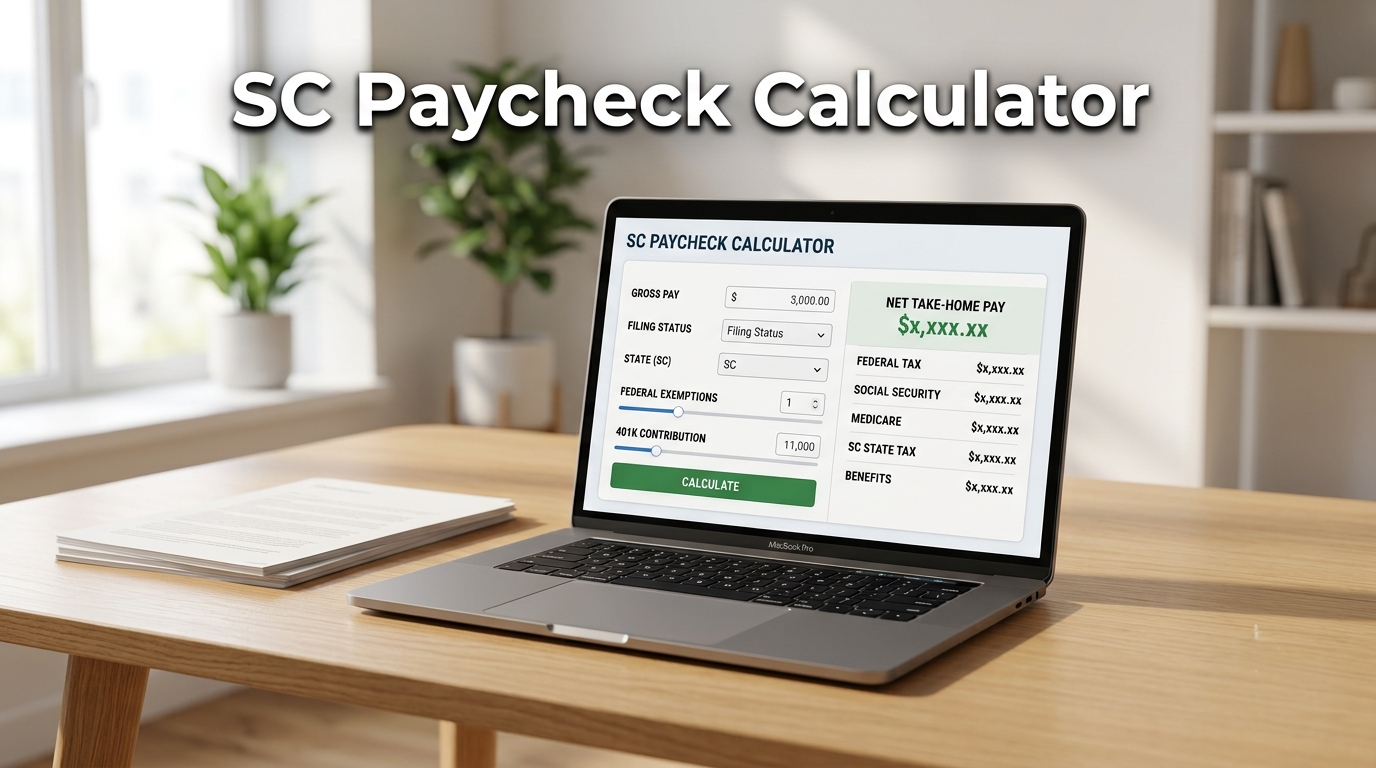
A paycheck calculator sc tool takes a few simple inputs — your gross pay, pay frequency, and filing status — and runs them through the same formulas an employer’s payroll system uses. The output is your estimated net pay, or take-home pay, after all mandatory deductions.
Here’s what it typically asks for:
- Gross wages (hourly rate × hours, or annual salary)
- Pay frequency (weekly, biweekly, semi-monthly, or monthly)
- Filing status (single, married, head of household)
- Pre-tax deductions (retirement contributions, health insurance)
- Any additional withholding you’ve requested on your W-4
Once you enter these details, a south carolina paycheck calculator applies federal tax withholding, South Carolina state tax, and FICA contributions to produce your final estimate. It’s not a replacement for your official pay stub — your employer’s payroll software may round differently or apply company-specific benefit deductions — but it’s an excellent planning tool for budgeting, negotiating a new salary, or comparing job offers side by side.
Most people use a south carolina paycheck calculator at a few key moments: right after accepting a new job, when negotiating a raise, when deciding between an hourly role and a salaried one, or simply when trying to rebuild a monthly budget from scratch.
Feature Breakdown: What Gets Deducted From Your Paycheck
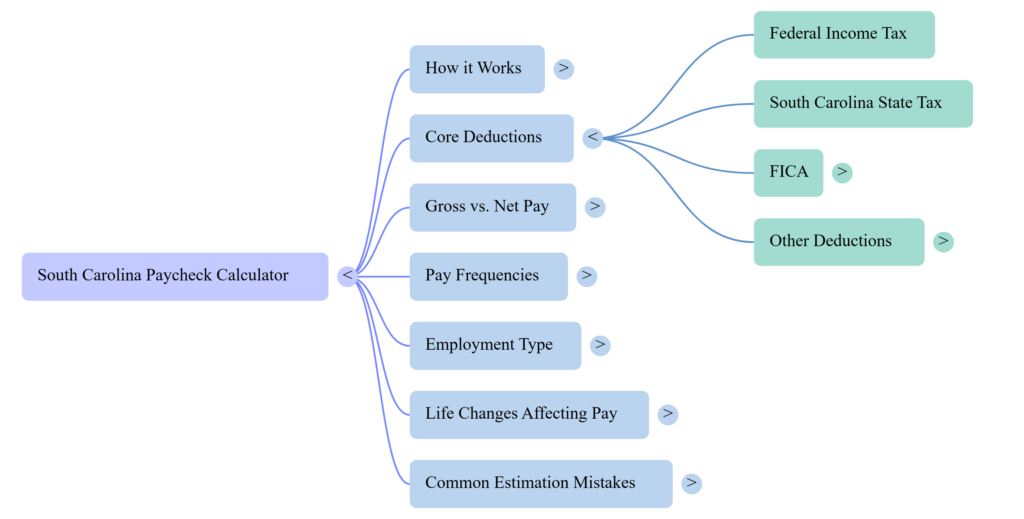
Every south carolina paycheck calculator accounts for a handful of standard deduction categories. Understanding each one makes the final number make sense instead of feeling like a mystery.
Federal Income Tax This is withheld based on the information from your W-4 form, including filing status and any additional withholding you request. It follows federal tax brackets, so the percentage withheld tends to rise as your income increases. If you’ve recently changed jobs, gotten married, or had a child, updating your W-4 keeps your withholding accurate.
South Carolina State Income Tax South Carolina applies its own state income tax on top of federal tax. The exact rate depends on your income level and filing status, and it’s recalculated any time the state legislature adjusts its tax brackets. A reliable south carolina paycheck tax calculator should reflect the current-year rate rather than an outdated one, since even small bracket shifts can change your estimated take-home pay by a noticeable amount over a full year.
How Social Security and Medicare Taxes Affect Your Paycheck
FICA: Social Security and Medicare FICA includes two federal payroll taxes—Social Security and Medicare—and both employees and employers share the cost. Social Security tax applies up to an annual wage cap, while Medicare tax applies to all earned wages, with an additional Medicare tax kicking in above certain income thresholds. These two deductions are consistent nationwide, so they apply the same way whether you live in South Carolina or anywhere else.
Pre-Tax and Post-Tax Deductions Contributions to a 401(k), health savings account, or employer-sponsored insurance often come out before taxes are calculated, which lowers your taxable income. Other deductions, like Roth retirement contributions or wage garnishments, are typically post-tax. Understanding the difference matters because pre-tax deductions actually reduce the income your federal and South Carolina state tax are calculated on — which is why maximizing them can quietly increase your take-home percentage.
Other Possible Deductions Depending on your employer, you might also see deductions for life insurance premiums, union dues, commuter benefits, or charitable payroll giving. None of these are unique to South Carolina, but they all factor into the gap between gross and net pay.
Gross Pay vs. Net Pay
Gross pay is everything you earn before any deductions — your hourly rate times hours worked, or your stated salary. Net pay is what’s left after federal tax, South Carolina state tax, FICA, and any voluntary deductions are subtracted. The gap between the two is exactly what an sc paycheck calculator is built to estimate.
It’s worth remembering that gross pay is usually the number quoted in a job offer, while net pay is the number that actually determines your monthly budget. Comparing two job offers by gross salary alone can be misleading if one comes with significantly higher pre-tax benefits or a different pay frequency.
For another hourly wage example, read our guide on how much $25 an hour is annually to see how an hourly rate translates into yearly gross income.
Estimated Take-Home Pay by Pay Frequency
The table below shows a simplified example for a $50,000 annual salary, single filer, no additional deductions, to illustrate how pay frequency changes the size — not the total — of your paycheck.
| Pay Frequency | Gross Pay per Period | Approx. Paychecks per Year |
| Weekly | ~$962 | 52 |
| Biweekly | ~$1,923 | 26 |
| Semi-Monthly | ~$2,083 | 24 |
| Monthly | ~$4,167 | 12 |
Notice that the annual total stays the same no matter how it’s split — what changes is how much cash arrives at once, and how often. That distinction matters more than people expect when it comes to budgeting for rent, bills, and savings goals.
Pros and Cons of Different Pay Frequencies
Weekly pay gives you the most frequent access to cash, which can help with tight budgeting and short billing cycles, but it also means more, smaller paychecks to track and reconcile.
Biweekly pay is the most common structure in the U.S. and strikes a balance between frequency and paycheck size — plus it produces two “extra” paychecks a year compared to semi-monthly pay, which many people use for savings goals or debt payoff.
Semi-monthly pay lines up neatly with monthly bills since paychecks land on consistent calendar dates (like the 1st and 15th), but the exact number of days between paychecks varies slightly month to month.
Monthly pay simplifies budgeting into a single larger deposit, but it requires more discipline to stretch funds across a full month without running short before the next payday.
Hourly vs. Salary: Which Calculator Approach Is Best?
If you’re paid hourly, your paycheck fluctuates with hours worked, so a paycheck calculator sc should factor in overtime — typically time-and-a-half after 40 hours in a workweek under federal rules. Hourly workers should also account for weeks with fewer scheduled hours, since those paychecks will naturally come in lower than a “standard” week.
Salaried employees have more predictable gross pay each period, so their calculator inputs are usually simpler — mainly annual salary, pay frequency, and filing status. The tradeoff is that salaried pay generally doesn’t change with hours worked, even during unusually busy weeks.
For anyone comparing an hourly offer to a salaried one, pairing this sc paycheck calculator with a salary-to-hourly conversion tool gives a clearer side-by-side picture of what each role actually pays per hour or per year. This is especially useful when one offer is quoted as an hourly rate and the other as an annual salary, since it’s easy to misjudge which one is actually worth more without converting them to the same basis.
If you want to compare an hourly wage with an annual salary, use our Salary to Hourly Calculator to estimate your gross earnings based on your working hours.
How Life Changes Affect Your Paycheck
Certain life events change your paycheck calculation even if your salary stays the same:
- Getting married can shift your filing status and change your federal and South Carolina withholding.
- Having a child may adjust your W-4 allowances and eligible tax credits.
- Enrolling in employer health insurance increases your pre-tax deductions, which lowers your taxable income.
- Increasing your 401(k) contribution reduces your taxable wages now, in exchange for building retirement savings.
Running your numbers through a south carolina paycheck calculator after any of these changes helps you catch surprises before they show up on payday instead of after.
Common Mistakes That Skew Paycheck Estimates
- Forgetting to update filing status after a major life change (marriage, new dependent)
- Ignoring pre-tax deductions, which lowers taxable income and changes the final withholding
- Using outdated South Carolina tax brackets instead of the current year’s rates
- Overlooking additional Medicare tax at higher income levels
- Assuming gross salary divided evenly by 12 equals monthly take-home pay, without factoring in taxes at all
- Mixing up biweekly (26 paychecks) and semi-monthly (24 paychecks) when estimating annual totals
How to Make Your Paycheck Estimate More Accurate
Follow these steps before relying on an estimate for budgeting or a job decision:
- Choose the correct tax year. Confirm whether you are estimating 2025 or 2026 income. South Carolina’s 2026 changes should not be applied to a 2025 return.
- Enter the correct gross earnings. Use your actual hourly rate and expected hours, or your annual salary and pay schedule.
- Select your filing status carefully. Use the status that applies to your tax situation, not simply whether you are married or single in everyday conversation.
- Review federal withholding elections. Check your Form W-4 and any additional amount you have asked your employer to withhold.
- Review South Carolina withholding. Check your SC W-4 and verify that your employer is using current state guidance.
- Enter workplace deductions separately. Include retirement, insurance, HSA, FSA, and other deductions only in the categories supported by the calculator.
- Compare the estimate with your pay stub. If the result differs substantially, check the inputs and ask payroll about unfamiliar deductions.
A SC Paycheck Calculator is most useful when its assumptions are transparent. It should identify its tax year, filing-status options, pay schedules, and treatment of common deductions. If it does not explain whether its South Carolina tax logic reflects the 2026 law, do not treat the result as a precise forecast.
For complex situations—such as working across state lines, receiving substantial bonuses, having multiple jobs, or changing residency during the year—consider getting help from a qualified tax professional.
Explore our Digital Productivity category for more practical salary guides, paycheck calculators, and tools that help you manage everyday work and finances.
Conclusion
South Carolina take-home pay depends on more than your gross salary. Federal income tax, state income tax, Social Security, Medicare, and workplace deductions all affect the amount you receive. The state’s 2026 income tax reform makes the tax-year setting especially important: the new two-rate structure and SCIAD rules are different from the previous state calculation.
Use a SC Paycheck Calculator with accurate earnings, filing status, pay frequency, and payroll deductions. Check that its 2026 state-tax assumptions reflect the new law, and compare the result with your actual pay statement when available. For unusual tax or residency circumstances, confirm the calculation with the South Carolina Department of Revenue or a qualified tax professional.
Understanding your paycheck doesn’t have to be a mystery. With a clear breakdown of federal tax, South Carolina state tax, and FICA, an sc paycheck calculator turns a confusing pay stub into a number you can actually plan around. Whether you’re budgeting for the month ahead, comparing job offers, switching from hourly to salaried work, or just curious where your money goes, using a south carolina paycheck calculator regularly — especially after any raise, filing status change, or new deduction — keeps your financial picture accurate and up to date.
Frequently Asked Questions
How much tax is taken out of my paycheck in South Carolina?
It depends on your income and filing status, but expect federal income tax, South Carolina state income tax, and FICA (Social Security and Medicare) to all be withheld from each paycheck.
What is South Carolina’s state income tax rate?
South Carolina uses a bracketed state income tax system, meaning your rate depends on your taxable income level. Always check the current year’s published brackets, since they can change annually.
How do I calculate my take-home pay in SC?
Start with your gross pay, subtract federal tax, South Carolina state tax, and FICA contributions, then subtract any pre-tax or post-tax deductions you’ve elected — the remainder is your net pay.
Does South Carolina have local payroll taxes?
South Carolina does not impose additional local income taxes on top of the state tax, unlike some states with city-level payroll taxes.
Is a paycheck calculator 100% accurate?
No calculator can match your exact pay stub down to the cent, since employers may apply unique deduction rules or benefit structures. Treat the result as a close estimate for planning purposes, not an official figure.