Battery Backup Calculator – Estimate Your Backup Time Accurately
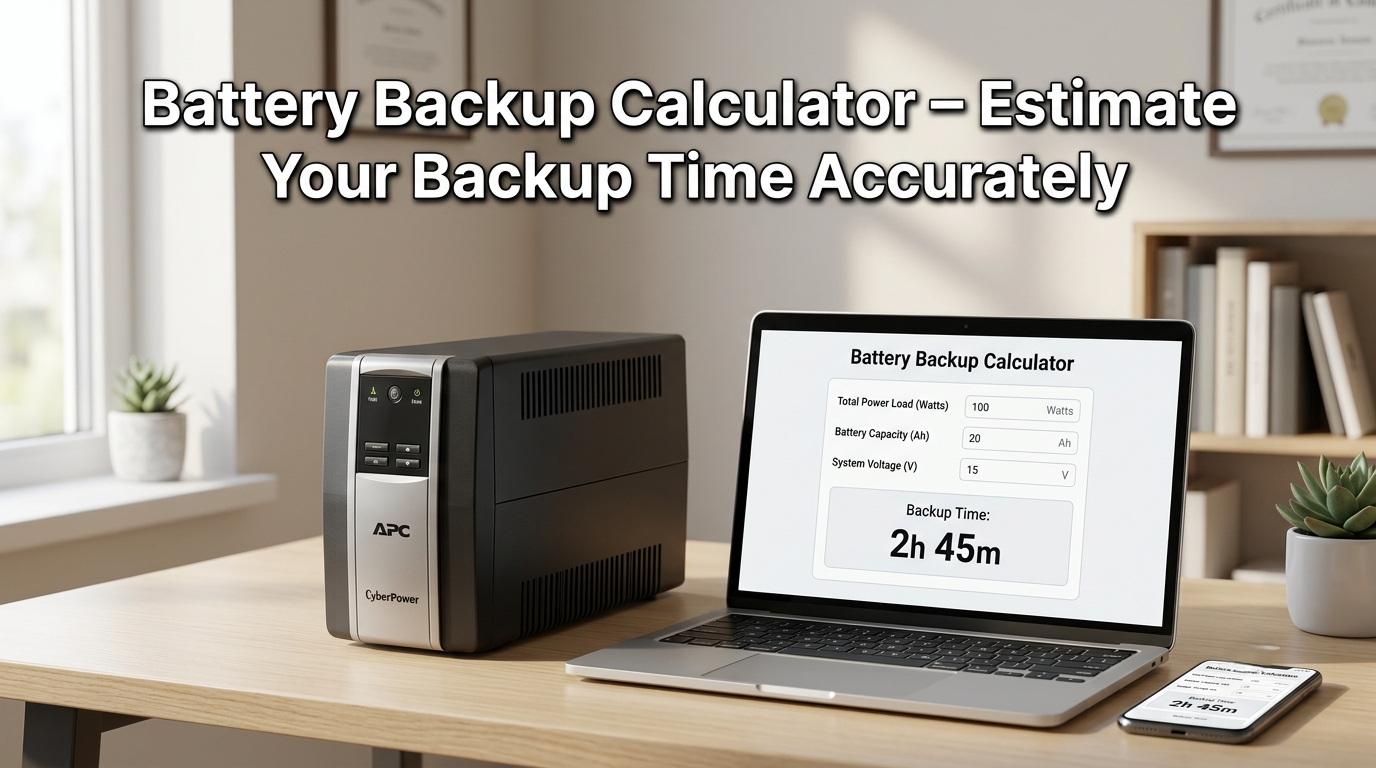
When the power goes out, the first question most people ask is simple: how long will my battery actually last? A battery backup calculator answers exactly that, turning your battery’s capacity, voltage, and connected load into a real runtime estimate instead of a guess. Whether you’re sizing an inverter for your home, checking how long a UPS will protect your computer during an outage, or trying to figure out the runtime of a specific battery like a 150Ah unit, the math behind it is more approachable than it looks once it’s broken down properly.
This guide walks through the complete battery backup formula, a ready-to-use time chart, separate explanations for UPS and inverter setups, and a detailed worked example using a 150Ah battery — one of the most commonly searched battery sizes for home backup systems. By the end, you’ll be able to estimate backup time for almost any battery and load combination with confidence.
Table of contents
What Is a Battery Backup Calculator?
A battery backup calculator is a tool (or formula) that estimates how long a battery can power a given electrical load before it’s fully discharged. It takes three core inputs — battery capacity, battery voltage, and the power draw of whatever you’re running — and converts them into an estimated runtime, usually expressed in hours or minutes.
This calculation matters because battery capacity alone (measured in amp-hours, or Ah) doesn’t directly tell you runtime. A 150Ah battery doesn’t automatically mean 150 hours of backup; the actual runtime depends heavily on how much power your load draws, how efficiently your inverter converts stored energy into usable electricity, and how deeply you’re willing to discharge the battery.
People typically reach for a battery backup calculator when planning for power outages, sizing a home inverter system, choosing a UPS for sensitive electronics, or evaluating whether their existing battery setup can handle a specific appliance or combination of devices during an outage.
To accurately estimate how long your battery or inverter system will last, use our Battery Backup Time Calculator.
Battery Backup Formula
The standard battery backup calculation starts with converting battery capacity into watt-hours, then dividing by your load:
Battery Watt-Hours = Battery Capacity (Ah) × Battery Voltage (V)
Backup Time (Hours) = Battery Watt-Hours ÷ Load (Watts)
For a more realistic estimate that accounts for real-world losses, the formula expands to include inverter efficiency and depth of discharge:
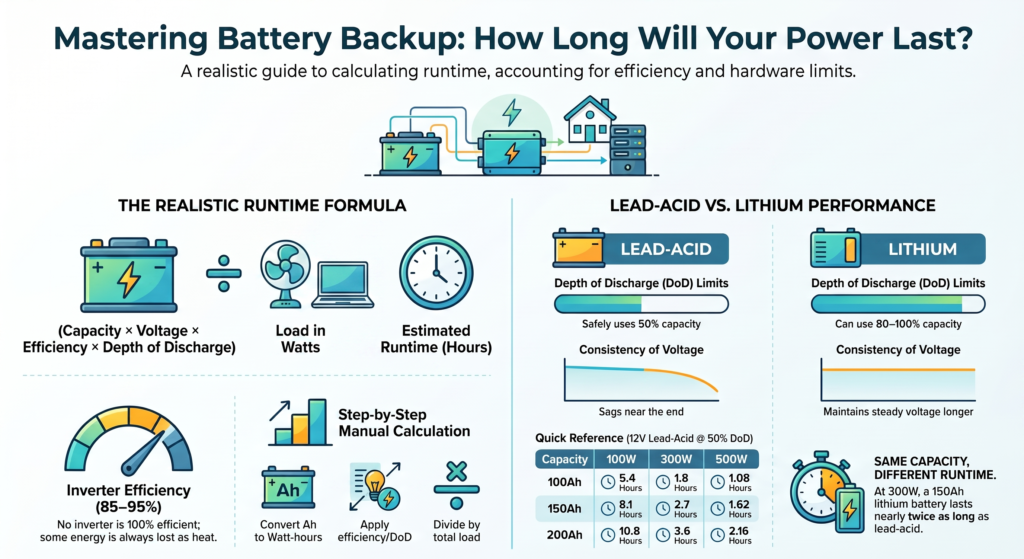
Backup Time (Hours) = (Battery Capacity × Voltage × Inverter Efficiency × Depth of Discharge) ÷ Load (Watts)
This expanded version is what separates a rough theoretical number from a realistic, trustworthy estimate.
Battery Backup Formula Explained
Each variable in the formula plays a distinct role:
- Battery Capacity (Ah) — how much charge the battery can store, found on the battery’s label or datasheet.
- Battery Voltage (V) — typically 12V for small systems, though 24V and 48V are common in larger home and commercial setups.
- Inverter Efficiency — no inverter converts stored DC power into usable AC power at 100% efficiency; most quality inverters operate between 85% and 95% efficiency, with the rest lost as heat.
- Depth of Discharge (DoD) — It represents the portion of a battery’s total capacity that you can use safely without reducing its lifespan or causing damage. To maximize service life, lead-acid batteries should generally not exceed a 50% depth of discharge (DoD). while lithium batteries can often handle 80–100% DoD safely.
- Load (Watts) — the total power draw of everything connected during the outage.
Ignoring inverter efficiency and depth of discharge causes people to overestimate theoretical battery backup time compared with actual real-world performance.
How to Calculate Battery Backup Time
Calculating backup time manually is a straightforward five-step process:
- Find your battery’s capacity (Ah) and voltage (V) — both are printed on the battery label or in the manufacturer’s specification sheet.
- Convert capacity to watt-hours — multiply Ah by voltage.
- Determine your inverter’s efficiency — check the inverter’s datasheet, or use 85–90% as a reasonable estimate if unknown.
- Apply a safe depth of discharge — 50% for lead-acid, up to 80–100% for lithium, depending on manufacturer guidance.
- Divide the adjusted watt-hours by your total load — this gives you backup time in hours.
Following these steps with a battery backup time calculator removes the guesswork and produces a far more realistic estimate than simply dividing capacity by load without adjustments.
Before estimating backup duration, calculate the total appliance load using our Home Appliance Energy Calculator.
Calculate Battery Runtime in Minutes & Hours
Once you have your backup time in hours, converting to minutes is simple: multiply by 60. For example, a calculated runtime of 2.5 hours equals 150 minutes. This conversion is particularly useful for UPS systems protecting sensitive electronics, where runtime is often measured in minutes rather than hours, since UPS backup is typically meant to bridge a brief outage or allow time for a safe shutdown rather than sustain a load for an extended period.
Battery Capacity Calculator
Understanding the relationship between amp-hours and watt-hours is central to any battery capacity calculator. Amp-hours (Ah) indicate the amount of current a battery can supply over a specific period, whereas watt-hours (Wh) represent the total stored energy by accounting for both current and voltage. Two batteries with same Ah rating but different voltages will store very different amounts of total energy — a 100Ah battery at 12V stores 1,200 watt-hours, while a 100Ah battery at 24V stores 2,400 watt-hours.
How Battery Capacity Affects Backup Time
The relationship between capacity and backup time is directly proportional when load and other factors stay constant: double the battery capacity, and you roughly double the runtime for the same load. This is why people often look for higher Ah-rated batteries (like 150Ah or 200Ah units) when they need longer backup duration, rather than relying on a smaller battery and hoping it stretches further than its actual capacity allows.
UPS Battery Backup Calculator
A UPS battery backup calculator follows the same core formula but is typically applied to much smaller, shorter-duration loads — protecting computers, networking equipment, or other sensitive electronics during brief outages or power fluctuations. UPS systems prioritize fast switchover and clean power delivery over long runtime, so their batteries are usually sized for minutes of backup rather than hours.
UPS vs Inverter Battery Backup
| Feature | UPS Battery Backup | Inverter Battery Backup |
| Typical Runtime | Minutes | Hours |
| Primary Use | Sensitive electronics, safe shutdown | Home appliances, extended outages |
| Switchover Time | Near-instant (milliseconds) | Slightly longer, sometimes seconds |
| Battery Size | Smaller, sealed batteries | Larger, often deep-cycle batteries |
Choosing between the two comes down to purpose: a UPS protects equipment from sudden power loss and gives you time to save work or shut down safely, while an inverter battery backup calculator is what you’d use to plan for sustaining lights, fans, or appliances through a longer outage.
Battery Backup Time Chart
For quick reference, here’s a battery backup time calculation table showing estimated runtime for common battery sizes at different load levels, assuming 12V batteries, 90% inverter efficiency, and 50% depth of discharge (typical for lead-acid):
| Battery Capacity | Load: 100W | Load: 300W | Load: 500W |
| 100Ah | 5.4 hrs | 1.8 hrs | 1.08 hrs |
| 150Ah | 8.1 hrs | 2.7 hrs | 1.62 hrs |
| 200Ah | 10.8 hrs | 3.6 hrs | 2.16 hrs |
This chart gives a realistic starting point for common home backup scenarios. If your battery voltage, inverter efficiency, or depth of discharge differs from these assumptions, simply apply the full formula above with your specific numbers for a more precise result.
Knowing appliance wattage is essential for backup calculations. Read our How to Find Watts guide to learn the formulas.
Common Battery Backup Examples
A frequently searched scenario is the 150ah battery backup time calculator case, so it’s worth walking through in detail. Suppose you have a 150Ah, 12V lead-acid battery running a 300W load through an inverter rated at 90% efficiency, with a safe depth of discharge of 50%.
Step 1: Battery watt-hours = 150 × 12 = 1,800 Wh Step 2: Usable watt-hours after DoD = 1,800 × 0.50 = 900 Wh Step 3: Adjusted for inverter efficiency = 900 × 0.90 = 810 Wh Step 4: Backup time = 810 ÷ 300 = 2.7 hours
This matches the chart above and illustrates exactly how depth of discharge and inverter efficiency bring the theoretical number (which would be 6 hours if you ignored both factors) down to a much more realistic 2.7 hours.
Factors That Affect Battery Backup
Several variables influence real-world backup time beyond the basic formula:
- Battery age and health — older batteries lose capacity over time, often delivering noticeably less runtime than their rated Ah suggests.
- Temperature — both lead-acid and lithium batteries perform worse in extreme cold, with usable capacity dropping in low temperatures.
- Battery chemistry — lithium batteries generally allow deeper, more efficient discharge cycles than lead-acid batteries, often translating into longer effective runtime for the same rated capacity.
- Inverter quality — cheaper inverters tend to have lower efficiency ratings, meaning more stored energy is lost as heat rather than delivered to your load.
- Load fluctuations — appliances with motors or compressors (refrigerators, air conditioners) don’t draw constant power, which can make real-world runtime estimates less precise than the simple formula suggests.
Tips to Increase Battery Backup Time
A few practical adjustments can meaningfully extend your backup runtime:
- Reduce connected load during an outage by turning off non-essential appliances and lighting.
- Choose a higher-efficiency inverter if you’re shopping for new equipment, since even a 5–10% efficiency gain compounds over longer outages.
- Consider lithium batteries for applications where deeper discharge and longer cycle life justify the higher upfront cost.
- Maintain your battery properly — keeping lead-acid batteries properly charged and avoiding deep discharges below recommended limits extends both backup time and overall battery lifespan.
- Size your battery bank with a buffer rather than calculating the bare minimum, since real-world performance is almost always slightly lower than theoretical estimates.
Lead-Acid vs Lithium: How Battery Type Changes Your Calculation
The same backup formula applies regardless of battery chemistry, but the inputs you plug in — particularly depth of discharge — differ enough to meaningfully change your final runtime estimate. This distinction matters more than many people realize when comparing two batteries with identical Ah ratings.
A typical lead-acid deep cycle battery is generally limited to around 50% depth of discharge to preserve its lifespan; discharging it further on a regular basis accelerates degradation and shortens the number of usable charge cycles over the battery’s life. A lithium battery of the same rated capacity, by contrast, can often be safely discharged to 80% or even close to 100%, depending on the manufacturer’s specifications, without the same long-term damage.
This means that two 150Ah batteries — one lead-acid, one lithium — can deliver noticeably different real-world backup times even though their labeled capacity is identical. Using the same 12V, 300W, 90%-efficient inverter example from earlier: the lead-acid battery at 50% DoD delivers roughly 2.7 hours, while a lithium battery at 90% DoD delivers closer to 4.86 hours under the same conditions. That’s nearly double the usable runtime from the same rated Ah capacity, purely due to how much of the battery you can safely use.
If you’re planning battery backup for a desktop system, read our PC Watt Calculator guide to estimate computer power usage.
Lithium batteries also tend to maintain more consistent voltage output as they discharge, whereas lead-acid batteries can experience voltage sag toward the end of a discharge cycle, which can affect how some inverters and connected equipment perform near the end of the runtime window. This is a smaller factor than depth of discharge, but it’s part of why lithium-based backup systems are increasingly common for applications where dependable, predictable runtime matters most.
Conclusion
Estimating backup time isn’t just a matter of dividing battery capacity by load — real-world runtime depends on voltage, inverter efficiency, and how deeply you can safely discharge your battery, which is exactly why a proper battery backup calculator gives far more reliable results than a quick mental shortcut. Once you understand the formula and the factors behind it, you can confidently estimate runtime for any battery size, from a small UPS battery to a 150Ah home backup system.
The most valuable habit to take from this guide: always factor in depth of discharge and inverter efficiency rather than relying on raw capacity alone, and build in a reasonable safety buffer when sizing your system. That one adjustment is the difference between a backup power setup that performs as expected during an outage and one that leaves you short when you need it most.
Explore our Smart Home guides for electrical calculations, energy-saving tips, and appliance power usage.
Frequently Asked Questions
How do I calculate battery backup time?
Multiply battery capacity (Ah) by voltage to get watt-hours, then divide by your load in watts. For a realistic estimate, also factor in inverter efficiency and a safe depth of discharge.
How long will a 150Ah battery last on backup?
It depends on the load and other factors, but as a worked example, a 150Ah, 12V battery running a 300W load through a 90%-efficient inverter at 50% depth of discharge provides roughly 2.7 hours of backup time.
What is the formula for battery backup calculation?
Backup Time (Hours) = (Battery Capacity × Voltage × Inverter Efficiency × Depth of Discharge) ÷ Load in Watts.
Does inverter efficiency affect battery backup time?
Yes. Since no inverter converts power with 100% efficiency, so it always loses some stored energy as heat, which directly reduces the available backup time. Higher-efficiency inverters preserve more runtime.
Is a UPS battery backup the same as an inverter battery backup?
Not exactly. UPS systems provide short-term backup power to protect sensitive electronics, while inverter battery backup systems deliver longer runtime to keep household appliances operating during extended power outages.
Can I use a battery backup calculator instead of doing the math manually?
Yes — a battery backup calculator applies the full formula instantly, factoring in capacity, voltage, efficiency, and depth of discharge, which is especially useful when comparing different battery sizes or load scenarios quickly.