How Many Watts Does a Laptop Use — Power Consumption & Cost Guide
Every household and home office runs on electricity, and understanding exactly how much power each device draws is the first step toward managing energy costs intelligently. How many watts does a laptop use is a question that matters whether you are calculating your monthly electricity bill, comparing the running costs of different devices, or simply trying to understand your home office energy footprint. Laptop power consumption varies far more than most people realise — a basic Chromebook and a high-end gaming laptop can differ by a factor of ten in their electricity draw — and knowing where your specific machine falls on that spectrum gives you the information needed to make smarter purchasing and usage decisions.
Table of contents
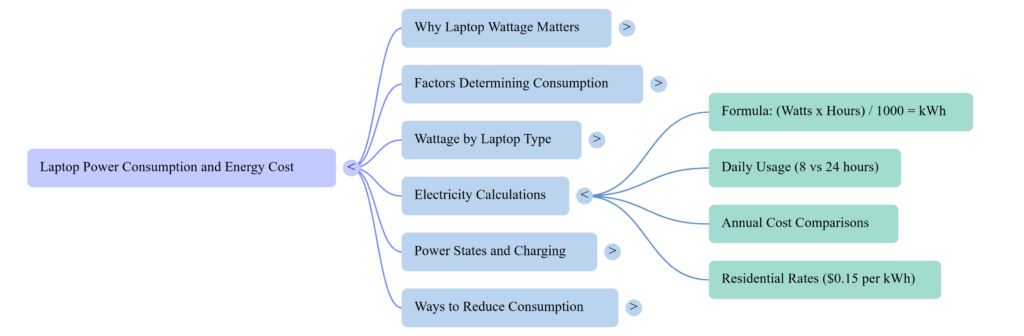
- Why Laptop Wattage Matters ?
- Laptop Power Consumption — What Determines How Many Watts a Laptop Uses
- Berapa Watt Laptop — Wattage by Laptop Type
- How Much Electricity Does a Laptop Use in 24 Hours?
- Laptop Electricity Cost — Monthly and Annual Calculations
- Laptop Power Consumption While Charging vs Running on Battery
- How to Reduce Laptop Power Consumption ?
- Conclusion
Why Laptop Wattage Matters?
The question of how many watts does a laptop use sits at the intersection of personal finance and environmental awareness. With electricity prices rising in most markets, the running cost of devices that operate for eight or more hours daily adds up to a meaningful annual figure. A home office worker running a laptop five days a week for a full year clocks well over a thousand hours of usage — and at that scale, even a ten-watt difference between two machines translates to a measurable difference in electricity spend.
Laptop power consumption also matters for people running on battery power away from a wall outlet, for those calculating solar panel or UPS requirements for their home setup, and for organisations tracking the aggregate energy footprint of a remote workforce. Understanding laptop watt consumption is practical knowledge with real financial and environmental applications.
The laptop wattage question has no single answer — but it has a range, and understanding what drives consumption within that range gives you everything needed to calculate your specific situation accurately.
Laptop Power Consumption — What Determines How Many Watts a Laptop Uses
How many watts does a laptop use depends on the interaction of several hardware and usage variables that shift consumption moment to moment during normal operation.
Processor type and workload is the dominant factor. A laptop running a spreadsheet draws far less power than the same laptop rendering video or running a demanding game. Modern processors throttle their performance — and their power draw — dynamically based on what is being asked of them. Idle consumption and peak consumption can differ by 30 watts or more on the same machine.
To estimate the power consumption of your laptop and other household devices, use our Home Appliance Energy Calculator.
Display size and brightness contributes meaningfully to total laptop power consumption. Larger screens draw more power, and higher brightness settings increase the display’s energy draw significantly. A 15-inch display at full brightness can add 5 to 10 watts over the same display at half brightness.
Dedicated versus integrated graphics separates standard laptop users from gaming laptop users in terms of energy draw. Integrated graphics that share memory with the processor add minimal consumption. Dedicated GPUs — standard in gaming laptops and many creative workstation laptops — add 30 to 80 watts of consumption when actively rendering.
Storage type has a modest but real impact. Traditional hard drives draw 2 to 5 watts. SSDs draw under 1 watt. Most modern laptops have transitioned to SSDs, making this a smaller factor than it was historically.
Battery charging state increases laptop watt draw noticeably when the battery is actively charging. A laptop drawing 45 watts during normal operation may draw 70 watts when simultaneously running and charging from a depleted battery state.
Berapa Watt Laptop — Wattage by Laptop Type
The Indonesian-language search “berapa watt laptop” — meaning “how many watts does a laptop use” — reflects the global relevance of this question, and the answer applies universally regardless of language or market.
| Laptop Type | Typical Wattage Range | Common Use Case |
| Chromebook | 10 — 30 watts | Light browsing and documents |
| Ultrabook / Thin and light | 25 — 45 watts | General productivity |
| Standard business laptop | 35 — 65 watts | Office work and video calls |
| Creative workstation laptop | 65 — 100 watts | Photo and video editing |
| Gaming laptop (mid-range) | 100 — 150 watts | Gaming at medium settings |
| Gaming laptop (high-end) | 150 — 300 watts | Gaming at high settings |
These ranges represent active usage consumption. Idle consumption — when the laptop is on but not performing demanding tasks — sits at the lower end of each range or below it. Sleep and standby modes draw 1 to 5 watts across all categories.
How Much Electricity Does a Laptop Use in 24 Hours?
How much electricity does a laptop use in 24 hours is the natural follow-up to the wattage question — converting the instantaneous power draw into the daily energy consumption that electricity bills are based on.
The calculation is straightforward: multiply the wattage by the hours of operation and divide by 1000 to convert watts to kilowatt-hours (kWh) — the unit electricity providers use for billing.
Formula: (Watts × Hours) ÷ 1000 = kWh consumed
Example for a standard business laptop at 50 watts: Running 8 hours: (50 × 8) ÷ 1000 = 0.4 kWh per day Running 24 hours: (50 × 24) ÷ 1000 = 1.2 kWh per day
Example for a gaming laptop at 180 watts: Running 8 hours: (180 × 8) ÷ 1000 = 1.44 kWh per day Running 24 hours: (180 × 24) ÷ 1000 = 4.32 kWh per day
At a typical US residential electricity rate of approximately $0.15 per kWh, the standard business laptop costs about $0.06 per day to run for 8 hours. The gaming laptop at the same usage pattern costs approximately $0.22 per day — nearly four times more. Scaled to a year of daily 8-hour use, that difference amounts to approximately $58 annually — a meaningful figure over the laptop’s lifespan.
You can estimate your laptop’s monthly electricity expenses with our Electricity Bill Calculator.
Laptop Electricity Cost — Monthly and Annual Calculations
Converting daily electricity consumption into monthly and annual cost figures gives the numbers that actually appear on household electricity bills.
For a standard home office laptop at 50 watts running 8 hours per day, 5 days per week:
Weekly consumption: 0.4 kWh × 5 = 2 kWh Monthly consumption: 2 × 4.33 = approximately 8.7 kWh Annual consumption: 8.7 × 12 = approximately 104 kWh
At $0.15 per kWh: Annual electricity cost approximately $15.60
For a gaming laptop at 180 watts running the same schedule:
Annual consumption: approximately 374 kWh Annual electricity cost approximately $56
The difference between laptop types in annual electricity cost — roughly $40 for this usage pattern — is modest relative to the hardware purchase price, but becomes more significant for households with multiple laptops or for users who run their machines for longer daily periods.
Laptop Power Consumption While Charging vs Running on Battery
One of the less understood aspects of laptop watt consumption is how power draw changes depending on whether the laptop is plugged in and whether battery is charging, fully charged, or depleted.
When a laptop runs on battery power alone, the hardware often throttles performance to extend runtime — reducing effective wattage below what the same tasks would draw while plugged in. This is a deliberate power management behaviour designed to maximise battery longevity per charge.
When plugged in with a full battery, the laptop draws only what its active workload requires — close to the rated operating wattage for that task.
When plugged in with a depleted battery actively charging, the laptop draws both its operational wattage and the additional power needed to replenish the battery. Charging adds approximately 20 to 40 watts to the consumption baseline, explaining why a 45-watt charger may still draw 65 to 70 watts from the wall during active charging under load.
If you want to compare laptop electricity usage with gaming devices, read our Games Console Electricity Usage Charge guide.
This variable draw behaviour means that the charger wattage printed on the power brick represents the maximum the adapter can deliver — not the constant draw during normal use.
How to Reduce Laptop Power Consumption?
Reducing how many watts a laptop uses during normal operation does not require purchasing new hardware. Several settings adjustments produce measurable consumption reductions.
Lowering display brightness to the minimum comfortable level is the single most impactful setting adjustment for most users. Display backlighting accounts for a significant portion of total consumption and responds directly to brightness settings.
Activating battery saver or balanced power modes through the operating system’s power management settings reduces processor performance and connectivity activity during low-demand tasks. These modes are particularly effective during activities like document editing and video calls that do not require peak processor performance.
Closing unused applications and browser tabs reduces the background processing that adds to instantaneous consumption without any visible benefit to the tasks actually being performed.
A complete home office setup also includes networking equipment. Learn more in our Broadband Router Electricity Cost guide.
Enabling automatic sleep after short idle periods ensures the laptop drops to near-zero consumption during breaks rather than continuing to draw full operating wattage while sitting unused. For authoritative data on home appliance energy consumption and electricity cost calculation methodology, the US Department of Energy’s Energy Saver resources provide verified consumption benchmarks and calculation tools that support the estimates in this guide.
Conclusion
How many watts does a laptop use is not a question with one answer — it is a question with a range, and your position within that range depends on the type of laptop you own, the tasks you perform, your display brightness settings, and whether your battery is actively charging. Standard productivity laptops consume 30 to 65 watts during normal operation, while gaming and creative workstation laptops can draw three to five times that amount under demanding loads. Converting that wattage figure into daily kWh consumption and then into monthly electricity cost gives you the concrete financial number that makes energy awareness actionable rather than abstract. Whether your goal is reducing your electricity bill, sizing a UPS or solar system for your home office, or simply understanding your household energy footprint more completely, laptop power consumption knowledge is a practical tool with immediate real-world application.
Explore our Smart Home guides for appliance energy usage, electricity-saving tips, and home efficiency calculators.
Frequently Asked Questions
How many watts does a laptop use on average?
The average laptop uses between 30 and 70 watts during normal operation, with ultrabooks at the lower end and standard business laptops in the middle range. Gaming laptops can exceed 200 watts at peak load.
How much electricity does a laptop use in 24 hours at 50 watts?
At 50 watts running continuously for 24 hours, a laptop consumes 1.2 kWh. At a typical rate of $0.15 per kWh, that equals approximately $0.18 per day or roughly $5.40 per month if run continuously.
Does laptop power consumption change when charging?
Yes — when the battery is actively charging alongside normal use, total power draw increases by approximately 20 to 40 watts above the standard operating wattage. A fully charged laptop running plugged in draws only what the active workload requires.
Is a gaming laptop significantly more expensive to run than a standard laptop?
Yes — high-end gaming laptops consuming 150 to 300 watts cost three to ten times more to run than standard business laptops consuming 35 to 65 watts, based on equivalent daily usage hours.
What is berapa watt laptop in practical terms?
“Berapa watt laptop” asks how many watts a laptop uses — the answer depends on laptop type, ranging from approximately 10 to 30 watts for Chromebooks up to 150 to 300 watts for high-performance gaming laptops under full load.
How can I measure my laptop’s actual power consumption?
A plug-in energy monitor — sometimes called a kill-a-watt meter — measures real-time consumption from the wall outlet and provides the most accurate reading of how many watts a laptop uses under your specific usage patterns.